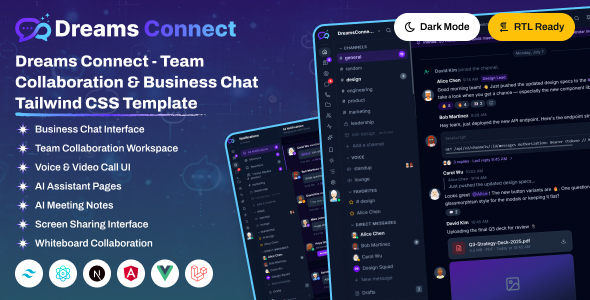
Dreams Connect – Team Collaboration & Business Chat Tailwind CSS Template is a modern website and interface template designed for team collaboration platforms, business communication tools, workplace messaging applications, and productivity-focused software products. Built around Tailwind CSS, this template provides a customizable front-end foundation for presenting digital communication solutions, showcasing collaboration features, and creating a professional online presence for businesses developing tools that help teams work together more efficiently.
Whether you are launching a business chat application, promoting a team messaging platform, introducing a workplace collaboration product, or developing a website for a productivity-focused SaaS business, Dreams Connect can serve as a starting point for your project. Its business communication theme is suitable for presenting messaging capabilities, team workflows, collaboration benefits, and product information in a structured and visually consistent format.
With customizable styling and an adaptable front-end structure, developers can tailor the design to suit their brand identity, target audience, and product requirements. Instead of creating every interface element from scratch, you can use the supplied template as a foundation and focus on refining the user experience and integrating the functionality your business needs.
Effective communication is essential for teams working across departments, offices, and remote locations. A professional collaboration website should explain how its product helps users communicate, share information, coordinate work, and manage daily activities.
Dreams Connect is intended for projects associated with business chat and team collaboration. Its design can be adapted to introduce a communication platform, highlight productivity features, explain common workflows, and guide visitors toward product demonstrations, registrations, or other relevant actions.
You can customize the presentation for startups, established businesses, software vendors, remote teams, and organizations developing workplace communication tools.
A clear visual hierarchy, consistent typography, and well-organized content can help visitors understand the product’s value without having to navigate a complicated website. By replacing sample content with accurate product information, you can create a more relevant experience for your intended audience.
Tailwind CSS is a utility-first CSS framework that allows developers to style interfaces using predefined utility classes. Rather than writing separate CSS rules for every small design adjustment, developers can compose layouts using classes for spacing, colors, typography, borders, alignment, and responsive behavior.
Dreams Connect uses Tailwind CSS as its styling foundation, making it suitable for developers who prefer a utility-based approach to front-end customization.
Depending on the supplied files, you may be able to adjust navigation, content sections, buttons, cards, page layouts, and other interface elements to match your design requirements. Tailwind’s responsive utilities can also help developers adapt layouts for desktop, tablet, and mobile screens.
Before beginning development, review the official documentation to confirm the Tailwind CSS version, build configuration, dependencies, and any additional technologies included in the package. The precise framework setup should be verified against the supplied source files.
Team collaboration encompasses several types of software, from internal messaging tools to broader workplace productivity platforms. Dreams Connect can provide a design starting point for different communication-related projects.
Potential applications include:
These are potential customization scenarios rather than confirmation that every type of application or dedicated page is included in the template.
A strong product introduction helps visitors quickly understand what a collaboration platform does and why it may be useful.
Dreams Connect can be customized to present a concise headline, supporting description, relevant visuals, and calls to action, depending on the supplied layouts. You can explain the primary problem your product solves, identify its intended users, and summarize the most important benefits.
For example, a business chat platform might emphasize organized conversations, while a broader collaboration product could focus on team coordination and workplace productivity.
Feature sections can provide more detail about the product’s capabilities. Possible topics include message organization, group conversations, file sharing, team notifications, search, and workflow integrations, provided those features are actually supported by your software.
Use real screenshots or accurate product mockups wherever possible. A visual preview can help potential customers understand the interface before signing up or requesting a demonstration.
Messaging is central to many business communication products. A suitable interface presentation can help explain how users navigate conversations, communicate with colleagues, and organize information.
If the supplied template includes messaging-oriented interface layouts, developers can customize them to illustrate features such as conversation lists, chat panels, message previews, user avatars, timestamps, and conversation categories.
A messaging interface should prioritize readability and make important actions easy to identify. Clear spacing, consistent typography, and a logical information hierarchy can help users understand the conversation flow.
For a marketing website, these interface elements can be presented through screenshots or illustrative product previews. If you are adapting the template into an actual application, the interface will also need functional message handling, data storage, user authentication, and other supporting systems.
A visual chat interface alone does not establish that real-time messaging or conversation synchronization is included.
Business communication often extends beyond individual messages. Teams may need to share project updates, coordinate responsibilities, discuss deadlines, and keep relevant information accessible.
Dreams Connect can serve as a starting point for explaining how a collaboration product supports these activities. You can customize content sections to describe team discussions, shared resources, work updates, and integrations with other business tools where appropriate.
For example, a product might help marketing teams coordinate campaign discussions or enable distributed teams to maintain communication across different locations.
Present these workflows through clear examples rather than broad claims about productivity. If your product includes task management, document collaboration, or project tracking, explain how those features work and how they connect with messaging.
Additional workflow capabilities should only be advertised when they are implemented in the actual software.
A business communication interface should make common actions easy to understand. Whether the website presents a product overview or demonstrates application screens, consistent design decisions can improve clarity and usability.
Dreams Connect’s styling can be adapted to reflect your preferred visual identity, depending on the supplied code. Customization opportunities may include:
A professional enterprise product may benefit from a restrained visual style, while a startup communication platform might use more expressive colors and contemporary graphics.
Keep the interface consistent across pages and use clear labels for important actions. If the template is used for a client project, align the visual presentation with the client’s existing brand guidelines.
Modern teams may access communication tools from desktop computers, tablets, and smartphones. A responsive layout helps ensure that important content remains accessible across different screen sizes.
Tailwind CSS offers responsive styling utilities that developers can use to adjust columns, spacing, typography, and element visibility at different breakpoints.
After customizing Dreams Connect, test the layout on a variety of devices. Verify that navigation remains usable, text is readable, buttons are easy to select, and interface previews scale appropriately.
If the template includes chat-style layouts, pay special attention to narrow screens, where conversation lists and message panels may require a different arrangement. Avoid hiding essential information or making users scroll horizontally to access important content.
The final responsive behavior depends on the supplied implementation, breakpoints, included components, and any modifications made during development.
A recognizable brand helps business software stand out in a competitive market. Dreams Connect can be adapted to reflect the identity of your communication product or software company.
You can replace demonstration logos, update color palettes, modify typography, and customize the imagery to suit your intended market. A product targeting large organizations may require a more formal presentation, while a collaboration tool for creative teams might benefit from a more energetic visual style.
Consistent branding across the homepage, feature sections, product previews, and footer can create a more cohesive experience.
Use original copy and relevant product imagery to distinguish your website from other software businesses. Avoid relying on generic claims such as guaranteed productivity improvements unless you can substantiate them.
Search engine optimization can help potential customers discover your business communication product through relevant searches. Dreams Connect provides a design starting point, but a template alone does not guarantee search rankings or organic traffic.
To improve your website’s search visibility, consider the following practices:
If the supplied package includes only front-end styling and HTML, metadata and semantic structure may need to be implemented or adjusted in the source files. Search performance also depends on content quality, technical implementation, competition, and the overall authority of the website.
Website performance is important for creating a smooth browsing experience, particularly for visitors accessing a SaaS marketing website on mobile connections.
To improve performance, optimize images, remove unused assets, minimize unnecessary dependencies, and review how external fonts and scripts are loaded. If the project includes a build process, follow the documented configuration for producing optimized production assets.
A utility-first styling approach can support consistent implementation, but the final result depends on how the source code is organized and maintained. Avoid adding unnecessary scripts or large third-party resources that do not provide meaningful value.
Test the finished website across supported browsers and screen sizes. Check for broken links, layout inconsistencies, JavaScript errors, and slow-loading elements before publishing.
A collaboration product may connect with external services to support authentication, analytics, communication, customer management, or subscription billing.
Dreams Connect can potentially be customized to direct users toward these services or display relevant integration information, depending on the available layouts and source code.
Possible integrations include:
These integrations may require API credentials, backend endpoints, environment variables, or third-party subscriptions. Sensitive credentials must not be exposed in publicly accessible front-end code.
Confirm which integrations are already included before planning your implementation. A template should not be treated as a fully operational business chat application unless the supplied documentation explicitly confirms the necessary functionality.
Business communication products may handle sensitive conversations, internal documents, and customer information. Security and privacy therefore need to be considered when developing the actual application.
A front-end template can provide the visual foundation, but production functionality requires appropriate security measures in the systems behind the interface.
Depending on your product, these measures may include secure authentication, server-side authorization, encrypted connections, input validation, access controls, secure file handling, and suitable data-retention policies.
If you connect user accounts or subscription services, use established security practices and avoid storing sensitive information directly in front-end code. Review privacy obligations applicable to your target customers and markets.
The template itself should not be assumed to provide backend security, real-time communication infrastructure, or data protection mechanisms.
Getting started with Dreams Connect generally involves preparing the development environment and configuring the supplied template files.
A typical workflow includes:
The precise steps depend on the supplied package, including whether it contains static HTML, JavaScript components, or a framework-based application. Follow the developer’s instructions rather than assuming a particular project structure.
Dreams Connect may be suitable for a range of software businesses and development projects.
It is especially relevant to users seeking a customizable front-end design rather than a complete messaging backend.
Before using Dreams Connect, review the official product listing, live demo, documentation, included files, framework version, dependencies, and licensing terms.
Confirm whether the package is a landing page, a collection of interface screens, or a broader front-end template. These categories can require very different levels of customization.
Features such as real-time messaging, file transfers, group administration, notifications, user authentication, database storage, and subscription billing should not be assumed to be included unless the documentation confirms them.
Understanding the template’s actual scope will help you plan the development process, choose suitable supporting technologies, and estimate any additional implementation work.
Dreams Connect – Team Collaboration & Business Chat Tailwind CSS Template offers a customizable starting point for presenting business messaging products, team collaboration platforms, and workplace productivity software. Its Tailwind CSS-based styling approach allows developers to adapt the visual presentation, customize interface elements, and create a website aligned with their product’s brand identity.
By combining clear product messaging, well-organized feature descriptions, responsive layouts, consistent branding, and useful calls to action, you can create a professional online presence for a communication-focused software business.
For SaaS founders, software companies, freelance developers, and digital agencies seeking a business chat and collaboration-themed design foundation, Dreams Connect is worth evaluating against its official demo and documented requirements before implementation.
1. All digital products are the most recent version, with no possibility of free updates. After payment, you can request an update to the most recent version for 5 days if a new version is released. We free support within 5 days.
2. If a license is required (Excludes WHMCS license , we provide only method not license), please contact us via email or ticket for assistance with activation. Our license is only valid for activation and does not include support.
3. We provide Mobile, PHP script installation services for $19.90 / ₹1700. Please create a backup after installation as we do not support re-installation. For mobile app source code, we do not offer installation services.
4. If you have any questions, please contact us by email [email protected] or create a ticket on this page
5. Please note that any digital products presented on the website do not contain malicious code, viruses or advertising. You will receive the original files from the developers. We do not sell any products that have been downloaded from other websites.
6. The response time can last up to 6 hours.
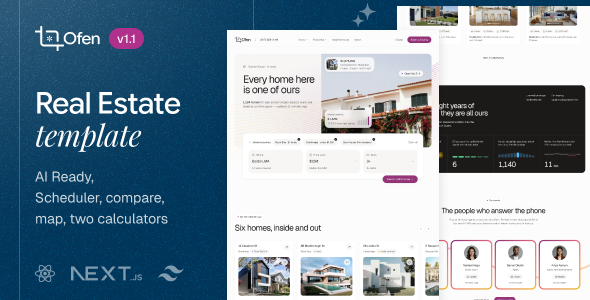
Ofen — Real Estate React NextJs Template Ofen — Real Estate React NextJs Template is a modern website template designed for real...

Orvexa | AI Operations HTML Admin Template Orvexa | AI Operations HTML Admin Template is a modern administrative dashboard template designed for...
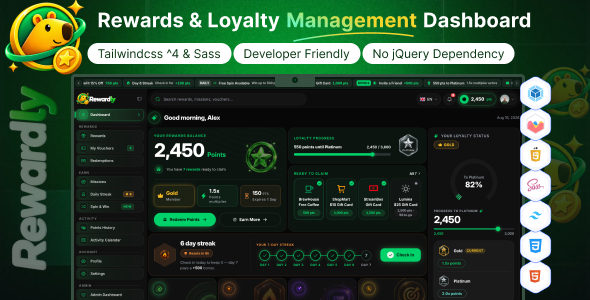
Rewardly - Rewards & Loyalty Management Dashboard Template Rewardly - Rewards & Loyalty Management Dashboard Template is a modern administrative dashboard template...
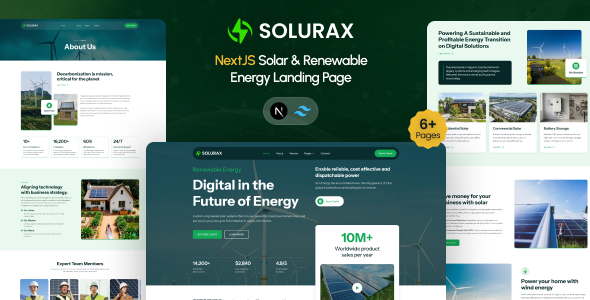
Solurax - NextJS Renewable & Solar Energy Landing Page Template Solurax - NextJS Renewable & Solar Energy Landing Page Template is a...
