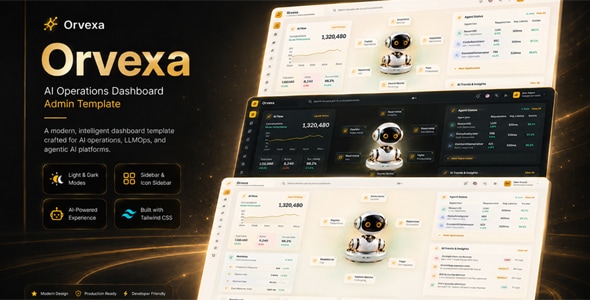
Orvexa | AI Operations HTML Admin Template is a modern administrative dashboard template designed for AI-powered applications, automation platforms, technology startups, and businesses that need a professional interface for managing digital operations. Built around HTML-based frontend technologies, Orvexa provides a starting point for creating organized administrative panels that present operational data, manage workflows, and support AI-focused application interfaces.
As businesses increasingly adopt artificial intelligence and workflow automation, they need clear interfaces to monitor activities, organize processes, and manage digital tools. Orvexa offers a frontend foundation for building an administrative experience that reflects these requirements. Developers can customize the design, navigation, content sections, and interface components to suit their application’s needs.
Whether you are developing an AI automation dashboard, an internal operations platform, a SaaS administration panel, or a business process management tool, Orvexa can serve as a starting point for your project. Its HTML-based structure provides flexibility for developers who want to customize the frontend and connect it to suitable backend services.
AI-focused applications often contain multiple workflows, data sources, processing tasks, and configuration options. A well-organized dashboard can help users understand these activities without navigating through complicated interfaces.
Orvexa is positioned for AI operations and administrative use cases, making it a potential foundation for interfaces that combine business management with automation-related functionality.
You can customize the visual design to match your brand identity. Update the colors, typography, navigation, icons, spacing, and content to create a consistent experience across the application.
For example, an AI automation platform may organize its interface around workflows, execution history, task status, and integration settings. An AI analytics application may instead focus on usage statistics, performance indicators, and reporting.
The exact layouts, design variations, and interface components depend on the supplied package. Review the official demo and documentation to confirm the available features before purchase.
HTML provides the structural foundation for web interfaces. As an HTML admin template, Orvexa offers a starting point for creating administrative pages, navigation menus, data displays, forms, and other frontend elements.
Developers can edit the supplied HTML files to customize page content, reorganize sections, and create additional layouts. CSS can be used to adjust the visual appearance, while JavaScript can support interactive interface behavior.
Depending on the package, the template may also include stylesheets, scripts, icons, fonts, and other frontend assets. Check the documentation to confirm the included files and any required dependencies.
An HTML template generally provides the frontend rather than a complete working AI application. Features such as AI model execution, API authentication, database operations, workflow scheduling, and user account management require a suitable backend or third-party integration unless explicitly included.
Orvexa can be adapted to several types of technology projects that require an administrative interface.
AI Automation Platforms: Create interfaces for presenting automation workflows, execution status, task history, and configuration options.
AI SaaS Applications: Build administrative screens for managing application settings, user accounts, service usage, and operational information.
Business Process Automation: Organize automated business tasks, workflow stages, activity records, and process monitoring interfaces.
AI Content Platforms: Develop dashboards for organizing content generation tasks, reviewing activity, and managing application settings.
Data Analytics Applications: Present metrics, data summaries, processing status, and business performance information.
AI Agent Management Systems: Create interfaces for organizing agent configurations, task records, execution history, and integration settings, where supported by the underlying application.
Technology Company Dashboards: Build internal interfaces for monitoring services, organizing operational data, and managing application resources.
Workflow Management Tools: Design administrative screens for task coordination, process visibility, and automation management.
These are potential implementation scenarios, not guaranteed built-in modules. Confirm the actual layouts and components before selecting Orvexa for a particular application.
Operational dashboards help users understand the status of a system and identify important changes. Summary cards, tables, and charts can present information in a format that is easier to review.
Orvexa can serve as a foundation for dashboard interfaces that display task counts, workflow status, processing summaries, usage information, and other operational indicators.
For example, an automation dashboard might show completed tasks, failed executions, pending jobs, and recent activity. An AI service management interface could display request volumes, usage statistics, or processing summaries.
Depending on the included components, developers may customize metric cards, chart areas, status indicators, and reporting sections.
However, demonstration charts and sample figures do not automatically connect to live data. Real operational metrics, automated calculations, historical reports, and real-time updates require suitable backend services and reliable data sources unless they are already included.
Automation platforms often need a clear way to present workflows and their execution status. An administrative interface can help users review tasks, identify errors, and understand the progress of different operations.
You can adapt the available layouts to display workflow names, task descriptions, execution timestamps, and status labels.
For example, an application might categorize tasks as pending, running, completed, or failed. These indicators can help users understand the state of an operation at a glance.
Developers may also extend the interface with task filters, execution history, error details, retry controls, or workflow configuration screens.
These features require working application logic. A visual status label does not execute a workflow, schedule a job, or retry a failed task automatically. Those operations must connect to an appropriate backend, automation engine, or external service.
AI-powered applications commonly connect to external services through APIs. An administrative interface can provide a place to configure integrations, review requests, and present the results returned by those services.
Orvexa can serve as a frontend starting point for applications that connect to compatible AI APIs or automation platforms.
Depending on your requirements, developers may extend the interface to support features such as AI request history, model selection, usage reporting, task configuration, or integration status.
The actual integration process depends on the chosen provider and the application’s architecture.
An HTML template does not automatically include an AI model, API connection, or automation engine. Developers must implement request handling, authentication, error management, usage controls, and appropriate data validation.
Keep API keys and other sensitive credentials on the server rather than exposing them in public HTML or client-side JavaScript.
Many AI operations platforms need tools for managing users, application preferences, and access permissions. A centralized administrative interface can make these tasks easier to organize.
Depending on the available components, Orvexa may be customized to display user records, profile information, account status, configuration forms, and other administrative details.
For applications with multiple user types, developers can create separate workflows for administrators, operators, and regular users.
However, interface screens alone do not provide secure authentication or role-based access control. Account creation, password recovery, session management, and permission enforcement require suitable backend implementation unless explicitly included.
Access restrictions should be enforced on the server. Hiding a navigation item or disabling a button is not sufficient to protect sensitive operations.
Administrative applications often need tables and forms for presenting information and collecting configuration data. Orvexa can provide a starting point for these common interface patterns.
Depending on the supplied package, developers may adapt tables for workflow records, execution history, user accounts, integration details, or operational logs.
Forms can be customized for application settings, task parameters, or other configuration requirements. Search, sorting, filtering, and pagination can also be added where needed.
An activity history section may help users review previous operations and investigate issues. For AI systems, this could include task timestamps, processing status, error summaries, and relevant request identifiers.
Actual data storage, filtering, and record updates require a working data source and appropriate backend logic unless they are already included.
Administrative users may access their applications from desktop computers, laptops, tablets, and mobile devices. A responsive interface can help maintain usability across different screen sizes.
During customization, test navigation menus, dashboard cards, data tables, forms, and charts on supported devices. Wide tables may need horizontal scrolling or alternative layouts on smaller screens.
Readable typography, clear labels, consistent spacing, and accessible controls can also improve the everyday user experience.
Actual responsive behavior depends on the template’s implementation. Review the supplied demo and test the customized interface across common browsers and screen sizes before deployment.
AI operations dashboards may interact with sensitive business data, external APIs, and automated processes. Security should therefore be considered from the beginning of development.
A production application should implement server-side authorization, input validation, secure session handling, appropriate API access controls, and protection against common web vulnerabilities.
Developers should also review dependency versions, error handling, data retention, and the exposure of sensitive information in logs. AI integrations may require additional controls for usage limits, prompt handling, and the protection of confidential data.
A frontend template alone cannot guarantee that an application is secure or reliable. The final result depends on the backend architecture, integration design, configuration, and ongoing maintenance.
Administrative dashboards are usually intended for authenticated users rather than public search traffic. Nevertheless, performance, maintainability, and accessibility remain important.
Developers can optimize images and other assets, review JavaScript dependencies, reduce unnecessary code, and organize stylesheets to support efficient loading.
For public-facing pages connected to the same application, suitable metadata and accessible content may help support search visibility.
Actual performance depends on the implementation, hosting environment, third-party scripts, and optimization work. A template alone cannot guarantee specific loading speeds or search rankings.
Orvexa is an option for developers and businesses seeking an HTML-based foundation for an AI operations or automation-focused administrative interface.
Its intended application area makes it relevant to projects involving workflow management, operational monitoring, AI service interfaces, and business automation tools.
Developers can customize the interface to match their brand and integrate it with appropriate backend services. For freelancers and web development agencies, the template may also provide a starting point for client projects that require a modern technology-focused dashboard.
The practical value of Orvexa depends on the included source files, available components, and the additional development required for the intended application.
Before purchasing or implementing Orvexa, review the official product listing and documentation to confirm:
An HTML admin template does not necessarily include an operational AI system, workflow engine, database, authentication service, or API integration. Verify the actual package contents and plan for additional development where necessary.
Orvexa | AI Operations HTML Admin Template is a potential choice for developers building administrative interfaces for AI-powered applications, automation platforms, and modern business tools.
It provides a starting point for presenting operational information, organizing workflows, managing configuration screens, and designing a consistent administrative experience. With appropriate customization, secure API integrations, and reliable backend development, the template can be adapted to different AI and automation projects.
Review the live demo and product documentation before purchase to ensure that the included components and technical requirements match your project.
Product Type: HTML Admin Dashboard Template
Category: AI Operations, Automation, Admin Dashboard, SaaS and Business Management
Technology: HTML, CSS, and JavaScript, depending on the included package
Ideal For: AI Startups, SaaS Businesses, Automation Developers, Technology Companies, Freelancers, and Web Development Agencies
Included Features, Files, and License: Refer to the official product listing and package documentation for exact details.
1. All digital products are the most recent version, with no possibility of free updates. After payment, you can request an update to the most recent version for 5 days if a new version is released. We free support within 5 days.
2. If a license is required (Excludes WHMCS license , we provide only method not license), please contact us via email or ticket for assistance with activation. Our license is only valid for activation and does not include support.
3. We provide Mobile, PHP script installation services for $19.90 / ₹1700. Please create a backup after installation as we do not support re-installation. For mobile app source code, we do not offer installation services.
4. If you have any questions, please contact us by email [email protected] or create a ticket on this page
5. Please note that any digital products presented on the website do not contain malicious code, viruses or advertising. You will receive the original files from the developers. We do not sell any products that have been downloaded from other websites.
6. The response time can last up to 6 hours.

Befox - Digital Agency & Creative Portfolio HTML Template Befox is a modern and professionally crafted HTML template designed for digital agencies,...

Saal — Tutor Marketplace React & Next.js Template Saal — Tutor Marketplace React & Next.js Template is a modern, professional, and feature-rich...
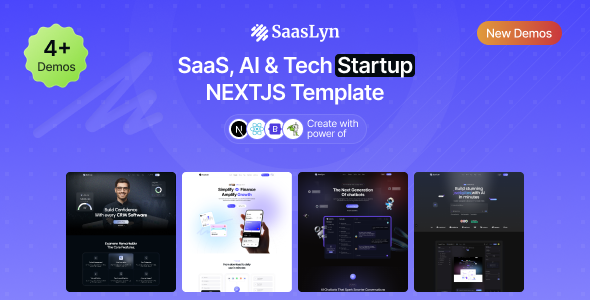
SaasLyn – SaaS, AI & Tech Startup NextJS Template SaasLyn is a modern, professional, and conversion-focused SaaS, AI & Tech Startup NextJS...
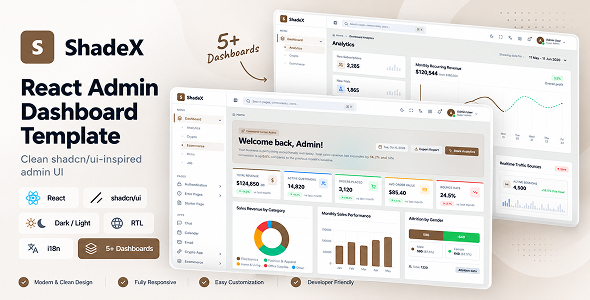
ShadeX – React Admin Dashboard Template with shadcn/ui, RTL & Dark Mode ShadeX – React Admin Dashboard Template with shadcn/ui, RTL &...
