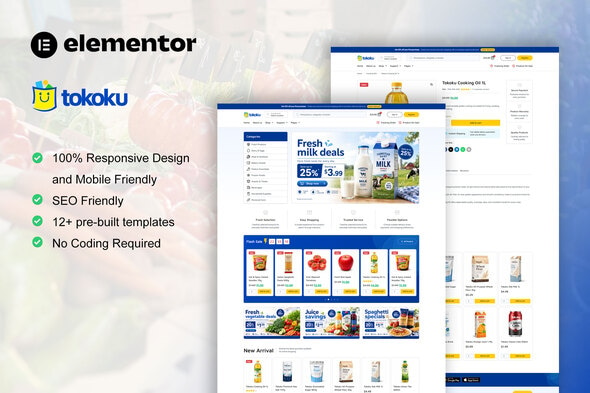
Tokoku – Grocery Store Food Elementor Pro Template Kit is a professionally oriented website template kit designed for grocery stores, food retailers, supermarkets, organic food shops, fresh produce businesses, and online grocery delivery services. Built for WordPress websites using Elementor, Tokoku provides a starting point for creating an attractive and organized online presence for businesses that sell groceries, fresh ingredients, packaged foods, and everyday household essentials. Whether you operate a neighborhood grocery shop, manage an organic food business, run a specialty food store, or plan to launch an online grocery shopping website, Tokoku can help you present your products and business information through a consistent digital storefront.
Modern customers increasingly use websites to explore product selections, learn about local food businesses, review store information, and discover convenient shopping options. A well-organized grocery website can make it easier for customers to find relevant products, understand available services, and contact a business when they need assistance. Tokoku is intended to support these needs through a grocery-focused design that can be customized to reflect your brand and business objectives.
As an Elementor Pro Template Kit, Tokoku is designed to provide reusable page layouts and design components for building a WordPress website with Elementor. Rather than serving as a complete standalone WordPress theme, a template kit generally supplies importable design templates that work with a compatible theme and the required plugins. This approach allows website owners to customize their pages visually while maintaining a consistent appearance across the website.
A grocery website should make products easy to discover while communicating freshness, convenience, and reliability. Customers may visit to explore available food categories, learn about store locations, understand delivery arrangements, or browse a selection of everyday essentials.
Tokoku provides a starting point for creating a website focused on grocery shopping and food retail. You can customize its design to match the identity of your business, whether you operate a traditional grocery store, a modern supermarket, a specialist food retailer, or an online fresh food business.
Use high-quality product photographs, clear headings, and a consistent color palette to create an organized presentation. Fresh produce businesses may emphasize fruit, vegetables, and natural ingredients, while supermarkets may focus on a broader selection of packaged foods, beverages, and household products.
A well-structured layout helps customers identify the main sections of your website quickly. Present essential information such as store details, product categories, delivery options, and contact information where visitors can easily find it.
The exact layouts and design elements available depend on the templates included in the Tokoku package and the versions of Elementor and other required tools.
Tokoku can be adapted for a variety of food retail businesses. Its intended niche makes it relevant to stores that sell groceries, fresh food, packaged products, and related essentials.
Potential applications include:
These are examples of potential use cases rather than a claim that every business type has a separate prebuilt template included in the kit.
Elementor is a visual page-building tool for WordPress that allows users to create and customize website layouts through a graphical interface. An Elementor Pro Template Kit provides reusable page designs and other supported templates that can be imported and adapted to suit a particular website.
Tokoku is intended to support a grocery-focused website-building workflow. Depending on the package contents, the kit may include page templates and design components for sections such as the homepage, product-related content, company information, services, and contact details.
After importing the relevant templates into a compatible WordPress installation, you can customize supported elements such as headings, text, images, colors, typography, spacing, and layout settings.
This visual editing approach can be useful for grocery business owners, freelancers, and website designers who want to build a customized website without manually coding every page.
A template kit is not the same as a complete theme or an eCommerce platform. You should verify the required WordPress theme, Elementor version, Elementor Pro requirements, and any additional plugins before beginning installation.
The homepage introduces your grocery business and helps visitors understand what you offer. It should communicate the store’s identity, highlight important categories, and direct customers toward useful information or shopping options.
Tokoku can serve as a foundation for a homepage that presents your grocery business through a series of organized content sections, depending on the templates supplied in the package.
Potential homepage sections include:
A local grocery shop might emphasize its neighborhood presence and fresh produce, while an online grocery business could prioritize its product categories and shopping links.
Use clear calls to action that direct visitors toward the relevant next step. If you accept online orders, ensure that shopping buttons lead to the correct product listings or store pages. If your business primarily operates offline, provide directions, opening hours, and contact details.
Keep promotional messages accurate and avoid filling the homepage with too many competing elements.
Customers often prefer to browse grocery products by category rather than searching through a single long list. A clear website structure helps visitors identify the products they need and explore related items.
Tokoku can provide a visual foundation for presenting grocery categories, depending on the supplied templates and your website configuration.
Potential categories include:
Choose categories that accurately reflect the products your business sells. Avoid creating unnecessary categories that make navigation more complicated.
For a large grocery catalog, you may also need product search, category filters, stock information, and sorting options. These functions typically depend on the eCommerce platform and its extensions rather than on the template kit alone.
Present product names, photographs, package sizes, prices, and availability clearly whenever the website includes product listings.
Accurate product information is particularly important for grocery websites because customers may need to check ingredients, quantities, storage requirements, or dietary suitability before purchasing.
When Tokoku is paired with an appropriate product management system, your website can present grocery items in a consistent format. The available product display features depend on the templates and underlying platform.
Useful product details may include:
For packaged food, use accurate information from the product label or manufacturer. For fresh produce, explain the product type, approximate quantity, and relevant availability details.
Avoid unsupported claims such as guaranteed health benefits or unverified organic certification. Accurate product information helps customers make informed decisions and supports a more trustworthy shopping experience.
If your goal is to accept online grocery orders, you will need an appropriate eCommerce platform. WooCommerce is a common option for WordPress websites and can provide the underlying shopping functionality when configured correctly.
Tokoku is an Elementor Pro Template Kit rather than a standalone eCommerce system. If its templates are compatible with your chosen WooCommerce setup, you can use them as part of the visual presentation for an online grocery store.
WooCommerce can provide core functionality such as:
For grocery businesses, additional functionality may be required for local delivery zones, scheduled delivery windows, minimum order values, product substitutions, pickup arrangements, or perishable goods management.
These capabilities may require compatible extensions, custom development, or a specialized delivery system. Confirm the compatibility of your selected plugins and test the complete ordering process before accepting real orders.
Many grocery businesses serve customers within a specific delivery area or offer in-store pickup. A website can help communicate these services and explain how customers can place orders.
Tokoku can be customized to present information about delivery availability, store locations, collection procedures, and service hours. Depending on your business model, you may create a dedicated page explaining delivery areas, order cut-off times, minimum purchase requirements, and applicable charges.
If your store accepts online orders, the underlying eCommerce platform and suitable extensions must manage the operational details. A template kit can present the information visually but should not be assumed to include delivery scheduling or route management by itself.
For local grocery stores, clear contact details and location information are especially useful. Make sure customers can determine whether their address is covered by your service before placing an order.
Keep delivery policies accurate and easy to understand. Explain any restrictions that apply to perishable products, unavailable items, substitutions, or changes to delivery schedules.
Promotions are a common part of grocery retail. Stores may feature weekly discounts, seasonal produce, new product arrivals, or special offers on selected categories.
Tokoku can be adapted to communicate promotions through supported page layouts and visual sections. You can use these areas to highlight relevant products, announce campaigns, or direct visitors toward a particular collection.
Examples include seasonal fruit offers, bakery promotions, discounts on pantry essentials, or selected household product deals.
If your website uses WooCommerce, you can manage supported sale prices and coupons through the store administration interface. More advanced promotional rules may require additional extensions.
Make sure every offer reflects the actual price and availability of the relevant products. If a promotion applies only to selected locations, dates, or quantities, explain those conditions clearly.
A well-organized promotional section helps visitors discover offers without making the website difficult to navigate.
Customers often want to understand the business behind a grocery store, particularly when buying fresh food or choosing a local supplier.
Tokoku can be customized to include an About Us page describing your store’s background, product selection, customer service approach, and business values. A local grocery retailer might introduce its history and community connections, while a specialty food store could explain its product focus and sourcing approach.
You can also present relevant information about store locations, operating hours, customer support, and delivery services.
If your business works with local farms or specific suppliers, describe those relationships accurately. Avoid making claims about sourcing, sustainability, organic status, or food quality unless you can substantiate them.
Clear business information gives visitors a better understanding of your organization and makes it easier for them to decide whether your store meets their needs.
A grocery website should make it easy for customers to ask questions about products, store locations, delivery options, and order procedures.
Tokoku can be customized to present contact information and inquiry links. Depending on the kit and installed plugins, you may be able to create contact forms for general questions, wholesale inquiries, supplier communication, or customer support.
Include your business telephone number, email address, operating hours, and physical address where appropriate. For businesses with multiple branches, consider providing separate location information for each store.
If your website accepts online orders, ensure that customers can find the appropriate channel for order-related questions. Contact forms should be tested to confirm that messages reach the correct recipient.
Collect only the information needed to handle each inquiry, and explain how customer information is processed in your privacy policy.
Customers may browse grocery products from desktop computers, tablets, and smartphones. A mobile-friendly website can make it easier to check product information, review store details, and navigate shopping pages.
Tokoku’s actual responsive behavior depends on the supplied templates, Elementor configuration, active theme, and any customizations you make.
Test important pages at different screen sizes, including the homepage, category pages, contact forms, and any product or checkout pages connected to your store.
Ensure that text remains readable, product images display correctly, and navigation controls are easy to use on smaller screens. For online grocery ordering, pay particular attention to quantity controls, cart summaries, delivery details, and checkout forms.
Use optimized images and avoid unnecessary visual elements that may slow down the website. A responsive template is a starting point; the completed website still needs to be tested for usability and accessibility.
Search engine optimization can help customers discover your grocery business when searching for local food stores, grocery products, fresh produce, or online delivery services.
Tokoku can provide a design foundation for an SEO-friendly website when combined with original content and appropriate technical configuration.
Create descriptive headings, clear category pages, accurate product information, and useful internal links. If your business serves a particular geographic area, include genuine location information and explain the areas you serve.
A local grocery business may benefit from a well-maintained business profile, consistent contact information, and a dedicated location page. An online grocery store may focus on product categories and the specific items it offers.
A compatible WordPress SEO plugin can help manage meta titles, meta descriptions, XML sitemaps, and other technical settings. If WooCommerce is installed, appropriate extensions may support product structured data.
SEO results depend on website quality, local competition, technical performance, and ongoing content development. A template kit alone does not guarantee search rankings or increased traffic.
Every grocery business has its own identity. A neighborhood store may emphasize familiarity and convenience, while an organic food retailer might focus on ingredient information and product sourcing.
Tokoku can be customized to align the website with your branding, depending on the design settings and templates included in the kit. You may adjust supported colors, typography, images, text, and layout elements using Elementor.
Use consistent branding across the homepage, category pages, business information, and promotional sections. Choose photographs that accurately represent your products and avoid using misleading imagery.
For a local grocery business, practical information such as opening hours and location may be more important than extensive decorative content. For an online grocery retailer, clear product categories and shopping links may deserve greater emphasis.
Before making extensive changes, review the template kit’s documentation and confirm that the selected WordPress theme and required plugins are compatible.
A reliable grocery website needs regular maintenance to remain functional and secure. Visitors expect pages to load correctly, contact forms to work, and product information to remain accurate.
Keep WordPress, Elementor, Elementor Pro, the active theme, and other installed plugins updated. Use strong administrator credentials, limit unnecessary user permissions, and maintain regular backups.
Optimize product images and other media to reduce loading times. Choose hosting that meets your website’s requirements and test the effect of additional plugins on performance.
If you accept online orders, verify that checkout, payment processing, order notifications, inventory updates, and delivery settings continue to work correctly after updates.
For grocery products, review pricing, stock availability, product details, and promotional information regularly. If your business sells perishable food, ensure that any displayed availability and delivery policies reflect your actual operating procedures.
Security and performance depend on the complete website setup, not solely on the template kit.
Tokoku is intended for businesses and professionals who want to create a WordPress website focused on groceries and food retail. Potential users include:
The appropriate setup depends on the business model. A physical grocery shop may primarily need product information, store hours, directions, and contact details. An online retailer will typically need WooCommerce or another suitable eCommerce platform, along with any additional delivery and order management tools required for its operations.
Review the official Tokoku documentation to confirm the supplied templates, required plugins, Elementor Pro requirements, and supported functionality before installation.
Before publishing a website using Tokoku, prepare the required business information, brand assets, and website functionality.
Recommended setup tasks include:
Advanced functions such as real-time stock synchronization, scheduled grocery delivery, delivery route management, advanced product filtering, and automated order notifications may require additional plugins or external services. Confirm the exact functionality available in your chosen setup before relying on it.
Tokoku offers a grocery-focused starting point for building a WordPress website with Elementor. Its intended niche makes it relevant to food retailers, supermarkets, fresh produce businesses, and grocery delivery companies looking for a consistent online presentation.
The template kit approach allows you to adapt the supplied page designs to your business rather than creating every layout from scratch. You can customize supported design elements, present store information, organize content, and build a visual identity that reflects your products and services.
For a business that wants to accept online orders, the kit can be combined with WooCommerce or another compatible eCommerce solution. Additional plugins can support delivery options, inventory management, and other operational requirements when compatible with the website.
The final result depends on the actual templates included, the active WordPress theme, the installed plugins, and the quality of your content and configuration.
Tokoku – Grocery Store Food Elementor Pro Template Kit is designed for grocery stores, food retailers, supermarkets, and related businesses that want to establish a professional WordPress website using Elementor.
It can provide a foundation for presenting grocery categories, introducing your business, communicating delivery information, highlighting promotions, and guiding visitors toward relevant products or services. With suitable customization, Tokoku can be adapted to local grocery stores, fresh food retailers, organic shops, and online grocery businesses.
Combine the kit with a compatible WordPress theme, the required Elementor tools, accurate product information, and an appropriate eCommerce solution if needed. With careful setup, responsive design, reliable hosting, and regular maintenance, you can create a useful online destination for your grocery business and its customers.
1. All digital products are the most recent version, with no possibility of free updates. After payment, you can request an update to the most recent version for 5 days if a new version is released. We free support within 5 days.
2. If a license is required (Excludes WHMCS license , we provide only method not license), please contact us via email or ticket for assistance with activation. Our license is only valid for activation and does not include support.
3. We provide Mobile, PHP script installation services for $19.90 / ₹1700. Please create a backup after installation as we do not support re-installation. For mobile app source code, we do not offer installation services.
4. If you have any questions, please contact us by email [email protected] or create a ticket on this page
5. Please note that any digital products presented on the website do not contain malicious code, viruses or advertising. You will receive the original files from the developers. We do not sell any products that have been downloaded from other websites.
6. The response time can last up to 6 hours.

Goyard - Resort and Hotel Booking WordPress Theme Goyard - Resort and Hotel Booking WordPress Theme is a luxurious, modern, and professionally...
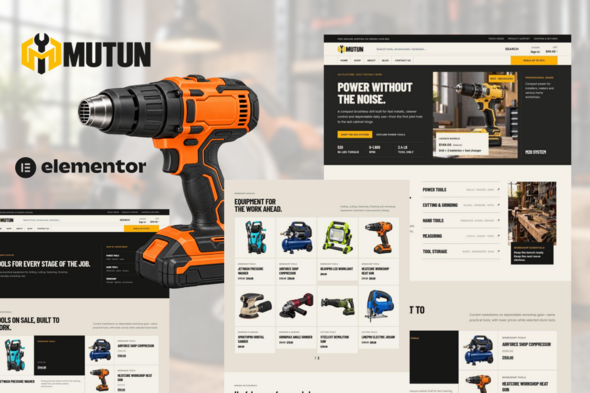
Mutun — Power Tools & Hardware Store Elementor Pro Template Kit Mutun — Power Tools & Hardware Store Elementor Pro Template Kit...
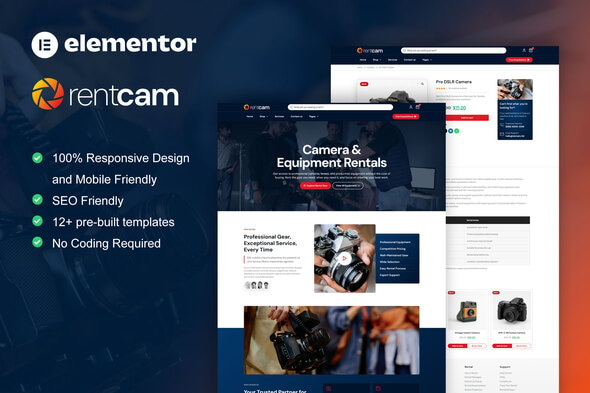
RentCam - Camera Rental Elementor Pro Template Kit RentCam - Camera Rental Elementor Pro Template Kit is a modern and professional website...

Intrix - Digital & Creative Agency WordPress Theme Intrix - Digital & Creative Agency WordPress Theme is a premium Digital & Creative...
