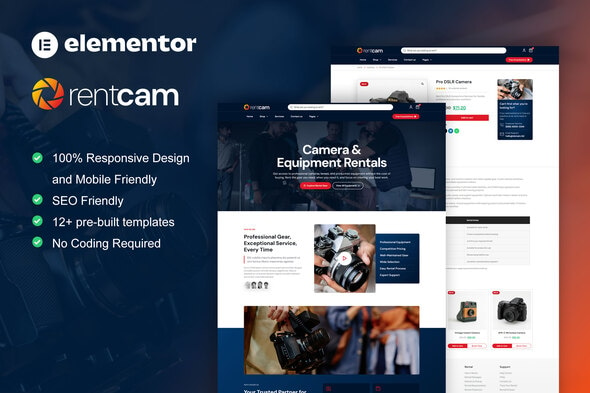
RentCam – Camera Rental Elementor Pro Template Kit is a modern and professional website design solution created for camera rental businesses, photography equipment providers, videography studios, production companies, and audiovisual equipment rental services. With a product-focused presentation and a contemporary design approach, RentCam provides a flexible foundation for showcasing rental equipment, highlighting available services, and building a professional online presence.
Designed for Elementor Pro, this template kit helps simplify the process of creating and customizing a WordPress website without requiring extensive coding knowledge. It offers a convenient starting point for presenting camera equipment, displaying rental categories, explaining rental policies, and encouraging customers to enquire about the gear they need.
Whether you operate a camera rental shop, provide professional filmmaking equipment, support photography projects, or supply production gear for commercial shoots, RentCam can help you establish a recognizable brand and make your rental services easier to discover online.
A well-organized equipment catalog helps customers identify the gear that fits their photography or filmmaking requirements. RentCam can be customized to present your available equipment in a structured and visually engaging format.
You can create categories for professional cameras, mirrorless cameras, DSLR cameras, cinema cameras, lenses, tripods, lighting kits, microphones, monitors, stabilizers, and other compatible production accessories.
Potential product information may include:
Actual equipment availability, inventory tracking, rental calendars, and automated pricing depend on your website setup and may require additional functionality beyond the template kit.
RentCam can provide a foundation for explaining the different rental services offered by your business. Clear service descriptions help customers understand what equipment is available and how they can arrange a rental.
Depending on your business model, you can create sections for:
You can also explain collection and return procedures, equipment handling guidelines, customer eligibility, and other important rental conditions.
Customers often compare technical specifications before renting photography and video equipment. RentCam can be adapted to display useful information that helps visitors evaluate different products.
Use individual equipment pages or suitable content sections to explain camera resolution, lens compatibility, recording formats, connectivity, supported accessories, and intended applications where relevant. Include clear photographs and accurate specifications to help customers make informed decisions.
You can also provide downloadable manuals, manufacturer links, equipment guides, or comparison information if these resources are available to your business.
For advanced filtering, searchable inventories, product comparisons, and real-time stock information, additional plugins or custom development may be necessary.
A clear rental process can make it easier for customers to understand how to reserve equipment. RentCam provides a design foundation for explaining your business procedures and guiding visitors through the next steps.
You can describe a rental workflow such as:
This is an example of a workflow you can communicate on your website, not a built-in automated booking system. Online reservations, date-based availability, deposit handling, identity verification, and payment processing may require additional plugins or integrations.
RentCam is designed for visual website customization through Elementor Pro. This allows you to adapt supported layouts and content to your business requirements without manually coding every page.
Customization possibilities include:
The exact editing options depend on the included templates, Elementor Pro version, and any additional plugins required by the kit.
Customers may search for camera rentals from smartphones while planning a photoshoot, video production, wedding, or commercial project. A responsive website helps make your equipment catalog and rental information accessible across different screen sizes.
RentCam is intended for responsive website creation, allowing you to adapt content presentation for desktop computers, tablets, and mobile devices. A well-organized mobile experience can help visitors browse equipment, review rental conditions, and contact your business more conveniently.
Before publishing, test your customized pages on different devices to ensure that product images, navigation, buttons, forms, and equipment descriptions remain clear and usable.
A professional rental website can help turn visitors into potential customers by making it easy to ask questions and request equipment availability.
RentCam can be adapted to include calls to action for checking rental rates, enquiring about equipment packages, discussing production requirements, or requesting a quotation. Contact forms, email links, telephone numbers, and WhatsApp links can also be incorporated where supported by your website setup.
For larger rental operations, you may consider integrating a customer relationship management system, automated enquiry notifications, or rental management software. These capabilities may require separate services or custom development.
Search engine optimization can help camera rental businesses reach photographers, filmmakers, content creators, and production teams looking for equipment in their area. RentCam can serve as a foundation for creating informative pages around your equipment categories and rental services.
Recommended SEO practices include:
A template kit does not guarantee search rankings. Results depend on content quality, technical configuration, competition, website performance, and ongoing SEO efforts.
RentCam – Camera Rental Elementor Pro Template Kit is intended for use with a compatible WordPress installation and Elementor Pro. It is a template kit rather than a standalone WordPress theme or a complete rental management application.
Before installation, review the product documentation and included files to confirm the required WordPress environment, compatible theme, Elementor version, and any additional plugins. An appropriate WordPress theme may need to be installed separately.
Features such as automated rental bookings, date-based inventory management, deposit collection, rental agreements, payment processing, and order tracking may require dedicated rental plugins, third-party services, or custom development.
RentCam – Camera Rental Elementor Pro Template Kit is suitable for:
A professional rental website can help customers explore equipment, understand rental conditions, and contact your business with confidence. RentCam provides an Elementor Pro-based design foundation that can simplify the process of building a modern website for photography and video equipment rentals.
Its equipment-focused presentation and customization possibilities make it suitable for showcasing rental categories, communicating service details, and promoting your business online. By combining the kit with authentic equipment photographs, accurate product specifications, transparent rental policies, and suitable integrations, you can create a website tailored to your rental operations.
RentCam – Camera Rental Elementor Pro Template Kit is a modern website design resource for camera rental shops, photography equipment providers, filmmakers, and audiovisual rental businesses. It offers a flexible foundation for presenting equipment, explaining rental services, sharing technical information, and generating customer enquiries through a professional WordPress website.
Whether you are launching a new camera rental business or improving an existing online presence, RentCam can help you create an organized and visually engaging website that supports your brand and connects you with photographers, filmmakers, and production teams.
Note: Please review the live demo, included templates, documentation, and plugin requirements before purchasing. Automated booking, real-time equipment availability, rental inventory management, deposit collection, and payment processing may require separate plugins or custom development.
1. All digital products are the most recent version, with no possibility of free updates. After payment, you can request an update to the most recent version for 5 days if a new version is released. We free support within 5 days.
2. If a license is required (Excludes WHMCS license , we provide only method not license), please contact us via email or ticket for assistance with activation. Our license is only valid for activation and does not include support.
3. We provide Mobile, PHP script installation services for $19.90 / ₹1700. Please create a backup after installation as we do not support re-installation. For mobile app source code, we do not offer installation services.
4. If you have any questions, please contact us by email [email protected] or create a ticket on this page
5. Please note that any digital products presented on the website do not contain malicious code, viruses or advertising. You will receive the original files from the developers. We do not sell any products that have been downloaded from other websites.
6. The response time can last up to 6 hours.
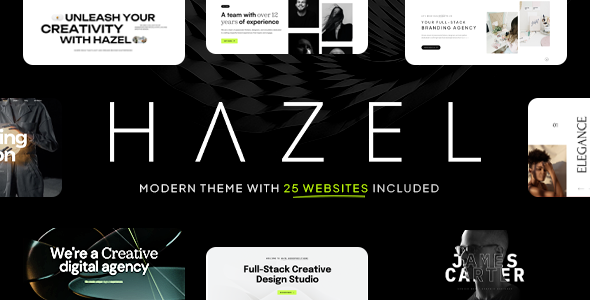
Hazel – Creative Agency Multi-Purpose WordPress Theme Hazel is a modern, creative, and versatile Creative Agency Multi-Purpose WordPress Theme designed for agencies,...
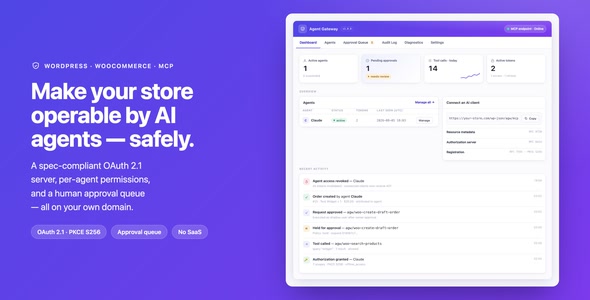
Agent Gateway: AI Agents for WooCommerce & WordPress (MCP + OAuth 2.1) Agent Gateway is an advanced AI integration plugin designed for...
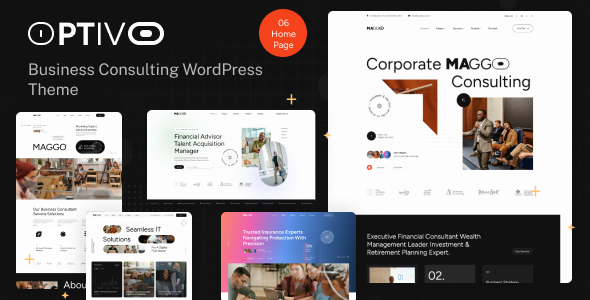
Optivo - Business Consulting WordPress Theme Optivo - Business Consulting WordPress Theme is a modern and professional website solution designed for business...
PGSports - Sport Club & Team WordPress Theme PGSports - Sport Club & Team WordPress Theme is a dynamic and professionally designed...
