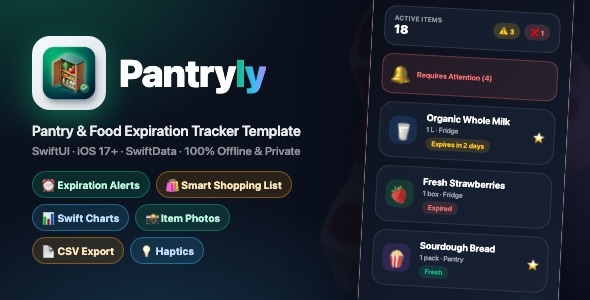
Pantryly | Pantry & Food Expiration Tracker with Shopping List — SwiftUI Template is a modern iOS app template designed for developers who want to create a convenient food inventory management and grocery planning application. Built with SwiftUI, Apple’s native user interface framework, Pantryly provides a foundation for developing an app that helps users organize pantry items, track food expiration dates, maintain shopping lists, and manage household food supplies from their iPhones.
Keeping track of groceries can become difficult when a household has numerous ingredients, packaged foods, spices, beverages, and other everyday essentials. Products can get forgotten at the back of cupboards, expiration dates can be overlooked, and duplicate purchases can increase unnecessary spending. A dedicated pantry management application can help simplify these tasks by bringing important inventory information and shopping needs together in one organized digital space.
Pantryly is designed around this practical household management concept. It can serve as a starting point for developers, startups, freelancers, and software agencies interested in building a food tracking or grocery organization app for iOS. With its SwiftUI foundation, the template can be adapted to a specific brand identity and extended according to the requirements of a personal productivity or household management product.
SwiftUI is Apple’s declarative framework for building user interfaces across its ecosystem. It allows developers to create interfaces using reusable components and state-driven layouts, helping maintain consistency throughout an application.
Pantryly uses SwiftUI as its primary interface technology, making it suitable for developers who want to work within Apple’s native development environment. The project can provide a starting point for customizing navigation, buttons, typography, colors, icons, and supported application screens.
For a pantry tracking app, the interface should make everyday tasks easy to complete. Users should be able to review their food inventory, update item details, check expiration dates, and access shopping lists without navigating through complicated menus.
Developers can adapt the available components to create a clean and accessible user experience. The supported iOS versions, Swift version, Xcode requirements, and exact interface components should be verified in the original product documentation.
Pantry inventory management helps users maintain a clearer picture of the food and household essentials they already have. Rather than relying on memory, users can refer to an organized digital list before preparing meals or purchasing groceries.
Pantryly provides a foundation for developing an inventory management experience centered on everyday food products. Depending on the functionality included in the template, developers may be able to organize items by name, category, quantity, or other supported attributes.
A household could use an inventory system to track rice, pasta, flour, cooking oil, canned goods, spices, snacks, beverages, and other frequently used products. Keeping these records up to date can make it easier to identify what needs replenishing and what is already available.
Additional information, such as purchase dates, storage locations, product brands, or unit measurements, may be incorporated where supported by the existing data structure or through further development.
An organized inventory can improve convenience while reducing the need to repeatedly check cupboards and refrigerators manually.
Monitoring expiration dates is an important part of managing household food supplies. When products are stored for long periods, it can be easy to forget which items should be checked or used first.
Pantryly is positioned around food expiration tracking, providing a starting point for an application that records relevant dates and helps users review their inventory. Depending on the included implementation, developers may be able to customize how expiration information is displayed and prioritized.
A useful expiration tracking interface should make important dates easy to recognize. Users may benefit from sorting inventory by date or identifying products that are approaching their recorded expiration dates.
This can support better household planning by helping users decide which products to review when preparing meals or organizing their pantry.
Developers should verify whether the template includes automatic reminders, expiration-based sorting, or visual status indicators. If these features are not already implemented, they may require additional development.
Recorded dates should be treated as reference information rather than a definitive assessment of food safety. Actual safety depends on the product, storage conditions, handling, and relevant food safety guidance.
A shopping list helps users organize purchases and remember essential items during grocery trips. When combined with pantry inventory, it can also help households identify missing products before visiting a supermarket.
Pantryly combines pantry management with a shopping list concept, making it suitable as a starting point for a household grocery planning application.
Depending on the supplied features, developers may be able to customize the shopping list workflow to support adding products, reviewing planned purchases, and updating item status after shopping.
For example, a user preparing for the week could check the pantry, identify missing ingredients, and add vegetables, milk, grains, or cooking essentials to the shopping list. This process can help reduce duplicate purchases and make grocery planning more organized.
Additional functionality, such as automatically suggesting items when stock is low or generating shopping lists from recipes, could be considered as an extension if those capabilities are not included in the original package.
A category-based inventory can make it easier to navigate a growing collection of food products. Rather than searching through one long list, users can locate items within logical groups.
Potential categories include grains and cereals, canned foods, spices, baking ingredients, snacks, beverages, dairy products, frozen foods, and household essentials.
Pantryly can provide a foundation for organizing inventory information, depending on its supported category and filtering features. Developers may be able to adjust category names, icons, labels, and layouts to match the application’s intended audience.
Well-organized categories can also support grocery planning. Users may find it easier to review what is missing from particular product groups and prepare a more structured shopping list.
The exact category management options should be checked in the original source package before assuming that custom categories or advanced filtering are available.
A household organization app should be practical for daily use. Users may open it briefly to check a product date, update a quantity, or mark an item as purchased, so important actions should be easy to locate.
Pantryly’s SwiftUI foundation offers a starting point for creating a clear mobile interface. Developers can review and customize the available screens to improve navigation and make the most frequently used features accessible.
Useful design considerations include readable text, clear product labels, intuitive buttons, consistent spacing, and helpful feedback when inventory information changes.
Empty states can guide new users through adding their first pantry items, while clear visual indicators can help distinguish ordinary inventory records from items that need attention.
Accessibility should also be considered during customization, including sufficient color contrast, appropriate touch target sizes, and support for relevant iOS accessibility settings.
Food waste can occur when products are forgotten, purchased unnecessarily, or left unused for too long. Maintaining an accurate inventory can help households become more aware of the food they already have.
Pantryly’s inventory and shopping list concept can support more organized grocery planning. Users can check existing supplies before shopping, review products approaching their recorded dates, and prioritize ingredients that need attention.
For example, before creating a weekly grocery list, a household could review its pantry and remove items that are already available. This can help reduce unnecessary purchases and improve the use of stored ingredients.
The effectiveness of this approach depends on users keeping their records accurate. Inventory information becomes more useful when quantities and dates are updated as products are purchased, consumed, opened, or discarded.
Features such as meal planning, recipe suggestions, and automated replenishment recommendations may extend the experience, but these should be treated as optional development opportunities unless explicitly included in the template.
Notifications can help users remember important dates without needing to check the application manually every day. For pantry management, reminders may be useful for products approaching their recorded expiration dates or for other inventory-related tasks.
If Pantryly includes notification functionality, developers should review its available settings, scheduling behavior, and supported reminder types. Otherwise, a suitable notification system may need to be added during customization.
A reliable reminder workflow should account for notification permissions, changes to stored dates, time zones, and iOS background execution limitations. Users should also have reasonable control over reminder preferences to avoid unnecessary notifications.
Testing should confirm that reminders are scheduled correctly and that changes to an item’s date or status are handled appropriately.
A pantry tracking app needs a dependable method for preserving information. Users expect their product lists and shopping records to remain available when they close and reopen the application.
Developers should inspect Pantryly’s original architecture to determine whether it uses local storage, a remote backend, or another persistence mechanism. The actual storage approach affects how the application can be extended and deployed.
Local persistence may be suitable for a personal app that stores data on one device. A cloud-based solution may be more appropriate if the product needs account-based access, backups, or synchronization between multiple devices.
Cloud synchronization is an additional architectural requirement unless already included. It may require authentication, backend APIs, conflict resolution, and appropriate security controls.
Before release, developers should test data creation, editing, deletion, application restarts, and recovery from unexpected interruptions to confirm that inventory records behave reliably.
A prebuilt SwiftUI template can reduce the initial work involved in establishing a mobile application’s interface and structure.
Pantryly may be customized with a new application name, logo, icon, color scheme, typography, onboarding screens, and supported layouts. The exact flexibility depends on the supplied source code and assets.
Developers can tailor the experience to different audiences, including families, individuals, meal-preparation enthusiasts, and users seeking better household organization.
A consistent visual identity across the app icon, inventory screens, expiration views, and shopping list can help create a recognizable product experience.
Additional functionality should be integrated carefully so that the application remains easy to navigate and the core pantry management workflow stays straightforward.
A responsive application makes everyday inventory updates more convenient. Users should be able to add products, change quantities, review expiration dates, and update shopping lists without unnecessary delays.
When customizing Pantryly, developers should test the app with realistic inventory sizes and verify that list rendering, date handling, and navigation remain responsive.
Testing should cover the supported iOS versions and different device sizes. If the application uses notifications or cloud services, those features should also be tested under realistic operating conditions.
Network errors should be handled gracefully when remote services are involved, and users should receive clear feedback if an operation cannot be completed.
The final performance and compatibility depend on the template’s implementation, dependencies, and any additional features introduced during development.
Although pantry information may seem routine, a household management application can reveal personal habits, grocery preferences, and household routines.
Developers should review the application’s data collection and storage practices before publishing. Any permissions or external services should be used only when necessary and explained clearly to users.
If user accounts or cloud synchronization are added, authentication and access controls should be implemented appropriately. Personal information should not be exposed through logs, analytics events, or unauthorized access.
Third-party analytics and advertising integrations may introduce additional privacy requirements. Developers should review relevant policies and prepare accurate disclosures.
An appropriate privacy policy and the required App Store privacy information should be prepared before releasing the finished application.
A pantry and food tracking application can support different business models depending on its features and target audience.
A developer could offer a free version with essential inventory tracking and a premium tier with additional organizational tools, advanced reminders, household sharing, or expanded functionality. These are possible product strategies, not confirmed features of Pantryly.
If the application is developed as a commercial product, in-app purchases or subscriptions may be considered using Apple’s supported purchase mechanisms.
Pricing should reflect the value offered to users and the ongoing cost of maintaining the application. Features such as cloud storage, synchronization, and external APIs can introduce additional operating expenses.
The actual monetization options depend on the included implementation and any additional development performed.
Pantryly may be suitable for several types of mobile application projects, including:
The best use case depends on the supplied functionality, storage architecture, technical requirements, and customization needed for the intended audience.
Before purchasing or installing Pantryly, review the official demo, documentation, source package, and technical requirements. Confirm the supported Swift and SwiftUI versions, minimum iOS version, Xcode requirements, dependencies, and storage approach.
A typical setup process involves opening the project in Xcode, resolving dependencies, configuring the application identifier, reviewing permissions, and running the app in a simulator or on a compatible iPhone.
Developers should test pantry item creation, expiration date entry, shopping list updates, and data persistence before extending the project. If reminders, cloud synchronization, or other advanced capabilities are required, verify whether they are already included or need separate implementation.
Before publishing, prepare the application icon, screenshots, store description, privacy policy, and other required App Store information. Testing on physical devices can help identify issues that may not appear in the simulator.
Pantryly offers a starting point for developers interested in building an iOS application focused on food inventory, expiration tracking, and grocery planning.
Its SwiftUI foundation can support a modern iOS interface, while its pantry management concept provides opportunities for customization around household organization and everyday shopping workflows.
For independent developers, startups, and digital agencies, a prebuilt template may reduce some initial interface development work compared with building every screen from scratch. Buyers should still inspect the source code, included functionality, data storage architecture, and technical requirements before using it in a production project.
Pantryly | Pantry & Food Expiration Tracker with Shopping List — SwiftUI Template is an iOS application template designed for developers who want to create a practical pantry management and grocery planning experience.
Its core concept brings food inventory, expiration date awareness, and shopping list organization into one mobile application. With suitable customization, developers can adapt the app to their brand and target audience while exploring additional capabilities such as notifications, household synchronization, and meal planning where needed.
Whether you are a freelance developer, startup, software agency, or entrepreneur exploring the household productivity market, Pantryly can provide a foundation for your project. Review the original documentation, verify the included features, and test data persistence and reminder behavior before releasing the finished application.
1. All digital products are the most recent version, with no possibility of free updates. After payment, you can request an update to the most recent version for 5 days if a new version is released. We free support within 5 days.
2. If a license is required (Excludes WHMCS license , we provide only method not license), please contact us via email or ticket for assistance with activation. Our license is only valid for activation and does not include support.
3. We provide Mobile, PHP script installation services for $19.90 / ₹1700. Please create a backup after installation as we do not support re-installation. For mobile app source code, we do not offer installation services.
4. If you have any questions, please contact us by email [email protected] or create a ticket on this page
5. Please note that any digital products presented on the website do not contain malicious code, viruses or advertising. You will receive the original files from the developers. We do not sell any products that have been downloaded from other websites.
6. The response time can last up to 6 hours.

Pahadi Trails | Tour and Travel Flutter UI Kit Create an engaging travel booking experience with Pahadi Trails | Tour and Travel...

Orvexa | AI Operations HTML Admin Template Orvexa | AI Operations HTML Admin Template is a modern administrative dashboard template designed for...
Eaterny | Food Delivery and Restaurant Flutter App UI Template Eaterny | Food Delivery and Restaurant Flutter App UI Template is a...

Nativa Theme - Landing & Client Portal Design for RedFamosa SMM Panel Nativa Theme is a modern and professionally designed landing page...
