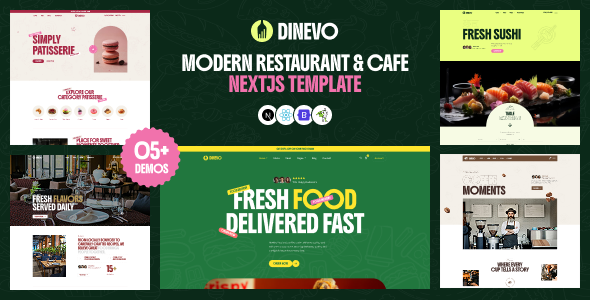
Dinevo – Modern Restaurant & Cafe Next.js Template is a stylish and contemporary website template designed for restaurants, cafés, coffee shops, bistros, bakeries, food businesses, and hospitality brands that want to establish a professional online presence. Built around the modern Next.js development ecosystem, Dinevo provides a front-end foundation for showcasing food menus, introducing a restaurant’s atmosphere, highlighting signature dishes, and encouraging customers to visit, inquire, or explore available services.
Whether you are launching a new café, managing an established restaurant, promoting a fine-dining experience, or building websites for hospitality clients, Dinevo can serve as a starting point for creating an attractive food and beverage website. Its restaurant-focused design can be customized to match different business identities, from cozy neighborhood cafés and artisan bakeries to contemporary dining establishments and premium restaurants.
With a well-organized website structure, engaging food photography, and clear presentation of essential business information, you can create a digital experience that helps customers discover your establishment and understand what makes it special.
A restaurant website should communicate the personality of the business while making essential information easy to find. Visitors often want to explore the menu, view food photographs, check the restaurant’s location, review opening hours, and learn how to make a reservation.
Dinevo provides a starting point for presenting these details through a modern, restaurant-oriented interface. Its visual style can be adapted to different hospitality concepts, including casual cafés, premium restaurants, fast-casual dining businesses, dessert shops, and specialty coffee outlets.
You can customize the website’s colors, typography, imagery, and content to reflect your restaurant’s branding. Warm tones and natural photography may suit a café, while elegant typography and minimalist visuals may work better for a fine-dining establishment.
A consistent visual identity across the homepage, menu, gallery, and contact sections can help establish recognition and create a more professional customer experience.
Next.js is a React-based framework used to develop modern web applications and websites. It provides development capabilities that can support structured page layouts, reusable interface components, routing, and different rendering strategies, depending on the project configuration.
As a Next.js template, Dinevo offers a front-end foundation that developers can customize to suit their website requirements. It can be adapted to display restaurant information, food categories, promotional content, and other hospitality-related details.
Developers familiar with React and JavaScript can modify the supplied components, update content, adjust styles, and connect the front end to appropriate data sources when required.
The exact technologies, package versions, and project structure depend on the files included with the template. Review the seller’s documentation to confirm the supported Next.js version, dependencies, installation instructions, and any additional requirements.
The homepage is often the first impression a potential customer receives of a restaurant. Dinevo can be customized to introduce your business, communicate your dining concept, and guide visitors toward important information.
A restaurant homepage may include a hero banner with an inviting headline, a brief brand introduction, featured dishes, menu highlights, opening hours, customer testimonials, and a reservation or contact call to action.
For example, a modern café could highlight specialty coffee, freshly baked pastries, and a comfortable atmosphere. A family restaurant might emphasize popular dishes, group dining, and convenient location information.
High-quality photographs can help visitors understand the restaurant’s style before they arrive. Keep the homepage focused on the information customers need most, and make menu and contact links easy to locate.
The precise homepage sections available depend on the layouts and components included in the supplied Dinevo package.
A clear online menu helps customers explore food and beverage options before visiting a restaurant. Dinevo can be adapted to organize menu information into logical categories that are easy to browse.
Possible categories include:
Each menu item can include a name, description, photograph, and price where supported by the selected layout. You can also highlight signature dishes or introduce seasonal offerings to encourage customers to discover new options.
For the best user experience, keep menu descriptions concise and prices accurate. If you provide allergen, dietary, or ingredient information, ensure it is correct and reflects the food actually served.
A front-end menu display does not automatically provide ordering, payment, kitchen management, or inventory functionality. These capabilities require appropriate backend development or third-party integrations.
Food photography is an important part of restaurant marketing because it allows visitors to visualize the dining experience. A well-presented gallery can showcase signature dishes, drinks, interior design, outdoor seating, and special events.
Dinevo can be customized with images that reflect the atmosphere and identity of your establishment. A specialty coffee shop might emphasize latte art and freshly prepared pastries, while a premium restaurant may focus on plated dishes, elegant interiors, and chef-created menus.
Use consistent image quality, appropriate cropping, and optimized file sizes to maintain a professional appearance without unnecessarily slowing down the website.
Authentic photographs of your restaurant and actual menu items are particularly valuable because they set realistic customer expectations. If the supplied template contains sample imagery, replace it with properly licensed photographs that represent your business.
Organizing food items into recognizable categories helps visitors navigate a menu efficiently. Dinevo can serve as a foundation for presenting individual dishes and highlighting the products that define your restaurant.
You might create a featured section for best-selling meals, chef recommendations, seasonal dishes, popular desserts, or specialty drinks. Each featured item can include a concise description that explains its ingredients, flavor profile, or distinctive preparation.
For a café, this could include signature coffee blends, cold beverages, cakes, and breakfast combinations. A restaurant might feature regional specialties, tasting menus, or customer favorites.
The layout should make important details easy to scan. Avoid excessively long descriptions or unnecessary visual effects that distract visitors from the food itself.
If the restaurant updates its menu frequently, consider connecting the website to a content management system or database so that menu changes can be managed more efficiently.
Many restaurants want their websites to encourage customers to reserve tables or contact the business directly. Dinevo can be customized with clear calls to action that guide visitors toward the appropriate reservation or inquiry process.
Potential options include a reservation button, telephone link, WhatsApp contact link, inquiry form, or link to an existing booking service.
For example, a fine-dining restaurant may prioritize table reservations, while a neighborhood café may focus on location details, opening hours, and direct contact information.
The actual functionality depends on how the website is implemented. A visually displayed reservation button does not automatically create a working booking system. Online reservations, availability checks, confirmation emails, and table management require a connected service or custom backend.
Test every form and call to action before publishing the website to ensure that customer inquiries reach the correct destination.
Many customers discover restaurants while using smartphones, especially when searching for nearby dining options or checking a menu before visiting. A responsive website helps ensure that important information remains accessible across mobile phones, tablets, laptops, and desktop computers.
Dinevo should be tested across different screen sizes using the actual template files and customized content. Important elements include the navigation menu, food photographs, menu categories, reservation links, location details, and contact information.
Mobile visitors should be able to read menu descriptions, find opening hours, and tap telephone or navigation links without excessive zooming or horizontal scrolling.
During development, test both short and long menu items, different image proportions, and multiple content sections. Make sure that buttons remain easy to use and that the layout maintains a clear visual hierarchy on smaller screens.
Responsive behavior should be verified after customization, particularly if you add third-party widgets or modify the supplied components.
Every restaurant has its own atmosphere, audience, and culinary identity. Dinevo can be customized to reflect your brand and create a consistent experience across the website.
Depending on the supplied project files, customization may include:
A casual café might use relaxed typography and warm colors, while a luxury restaurant may prefer a more restrained visual style. A family restaurant may prioritize menu accessibility, location information, and practical customer details.
Developers can adjust the components and styles to fit the restaurant’s needs. Major layout changes or advanced functionality may require additional programming.
A gallery can help potential customers understand the atmosphere of a restaurant before deciding to visit. Interior photographs, outdoor seating, dining areas, food presentations, and event images can communicate the experience more effectively than text alone.
Dinevo can be customized to present visual content in a structured gallery or selected image sections, depending on the components included in the template.
For a café, photographs of the seating area, coffee counter, and bakery display may be particularly useful. A wedding or event venue may benefit from images showing table arrangements, private dining spaces, and celebrations.
Use descriptive alternative text for meaningful images and ensure that gallery layouts remain usable on mobile devices. Optimize images for web delivery to balance visual quality with loading speed.
Customer reviews and testimonials can help visitors feel more confident about choosing a restaurant. If the template includes suitable sections, or if you add them during customization, you can highlight genuine feedback about food quality, service, atmosphere, and overall dining experiences.
Testimonials should be authentic and published with appropriate permission. You may also direct customers to established review platforms where they can read additional feedback.
For new restaurants without an extensive review history, focus on clear menu information, authentic photographs, accurate business details, and a compelling introduction to the dining concept.
Avoid publishing fabricated ratings or testimonials. Trustworthy information helps establish realistic expectations and supports long-term customer relationships.
Search engine optimization can help customers discover your restaurant when looking for relevant food and dining options. A properly structured website provides a useful foundation for presenting information about your location, cuisine, menu, and services.
When customizing Dinevo, consider using descriptive page titles, concise meta descriptions, logical headings, and informative text. Include your restaurant’s name, location, cuisine type, and relevant services naturally where appropriate.
Useful content may include menu descriptions, information about special dining experiences, event offerings, and details about the restaurant’s culinary approach.
Developers can also explore appropriate structured data for restaurants, including supported local business information, opening hours, and menu details. Implementation should follow the relevant search engine guidelines.
A Next.js template does not guarantee search engine rankings or local visibility. Results depend on technical configuration, useful content, site performance, business profile accuracy, competition, and ongoing optimization.
A restaurant website should load efficiently and make important information easy to access. Dinevo’s final performance will depend on the supplied code, image assets, JavaScript dependencies, hosting environment, and any custom integrations.
To support a smoother experience, optimize large food photographs, avoid unnecessary scripts, use appropriate image-loading techniques, and test important pages with suitable performance tools.
The Next.js ecosystem provides different rendering and optimization options, but their availability and implementation depend on the project setup. Developers should review the supplied configuration rather than assuming every framework capability is already enabled.
Also test navigation, forms, telephone links, external booking services, and map links. A visually attractive website is most useful when customers can complete common tasks without confusion.
Dinevo can be adapted for a range of food and hospitality businesses, depending on the layouts and features included in the package.
Restaurants: Present menus, signature dishes, location information, and dining experiences.
Cafés and Coffee Shops: Showcase specialty drinks, pastries, breakfast menus, and the café atmosphere.
Bakeries and Dessert Shops: Highlight cakes, breads, pastries, desserts, and seasonal products.
Fine-Dining Establishments: Communicate a premium dining concept through elegant imagery and carefully organized content.
Bistros and Casual Dining Businesses: Make menus, opening hours, and customer contact details easy to find.
Food Startups: Establish a professional online presence for a new dining concept.
Restaurant Web Design Agencies: Use the template as a development starting point for hospitality clients.
The suitability of each use case depends on the actual included components and the customizations required.
Dinevo provides a starting point for businesses that want to create a modern restaurant or café website using the Next.js development ecosystem.
Potential benefits include:
The final capabilities depend on the supplied template package, its dependencies, and the integrations implemented during development.
Setting up Dinevo typically involves downloading the supplied package, reviewing its documentation, installing the required dependencies, and configuring the website for your restaurant.
A general setup process includes:
The exact commands and deployment requirements depend on the included Next.js version and project configuration. Follow the seller’s documentation to avoid compatibility issues.
Dinevo is a potential choice for restaurant owners, café businesses, and web developers who need a modern front-end starting point for a hospitality website. Its intended use case supports presenting food menus, highlighting signature dishes, communicating a restaurant’s identity, and helping visitors find essential business information.
The Next.js foundation is particularly relevant for developers who want to customize the source code and connect the website to suitable data sources or external services. It can support a range of implementation approaches depending on the supplied code and project requirements.
To achieve the best results, combine the template with authentic food photography, accurate menu details, clear navigation, mobile testing, and functional contact or reservation links. Before purchasing, review the official demo and included features to confirm that the template matches your intended project.
Dinevo – Modern Restaurant & Cafe Next.js Template provides a foundation for creating a professional website for restaurants, cafés, bakeries, bistros, and other food businesses. Its restaurant-focused purpose makes it suitable for presenting menus, showcasing signature dishes, introducing a dining concept, and communicating essential customer information.
With thoughtful customization, optimized photography, clear content, and appropriate integrations, developers can build a polished online presence that reflects a restaurant’s identity and helps customers discover its offerings.
Whether you are launching a new café website or developing a hospitality project for a client, Dinevo can be a useful starting point for front-end development. Review the seller’s official documentation, demo, dependencies, and feature list before purchasing to ensure that the supplied template meets your requirements.
1. All digital products are the most recent version, with no possibility of free updates. After payment, you can request an update to the most recent version for 5 days if a new version is released. We free support within 5 days.
2. If a license is required (Excludes WHMCS license , we provide only method not license), please contact us via email or ticket for assistance with activation. Our license is only valid for activation and does not include support.
3. We provide Mobile, PHP script installation services for $19.90 / ₹1700. Please create a backup after installation as we do not support re-installation. For mobile app source code, we do not offer installation services.
4. If you have any questions, please contact us by email [email protected] or create a ticket on this page
5. Please note that any digital products presented on the website do not contain malicious code, viruses or advertising. You will receive the original files from the developers. We do not sell any products that have been downloaded from other websites.
6. The response time can last up to 6 hours.
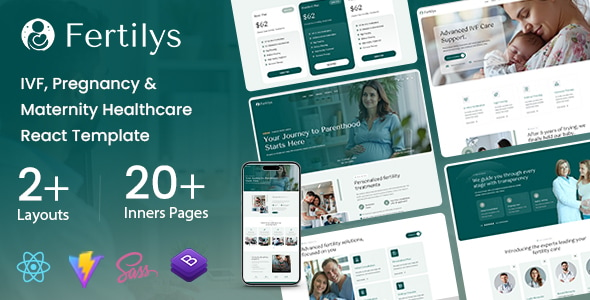
Fertilys – IVF, Pregnancy React Template Fertilys – IVF, Pregnancy React Template is a modern and professionally designed website template created for...
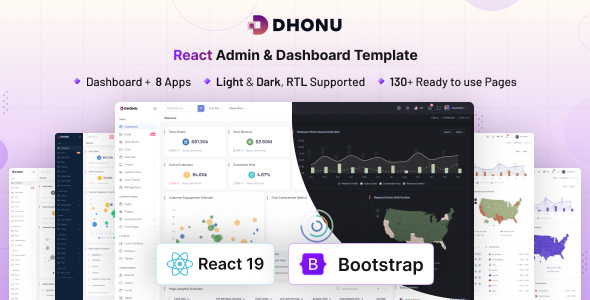
Dhonu - React Admin & Dashboard Template Dhonu - React Admin & Dashboard Template is a modern web interface template designed for...
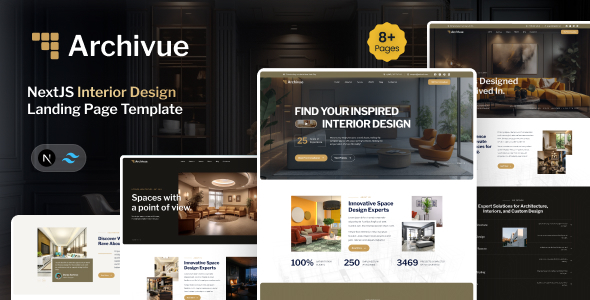
Archivue - NextJS Interior Design Landing Page Template Archivue - NextJS Interior Design Landing Page Template is a modern website template designed...
Matterly - AI Law Firm Management SaaS With Smart Forms Matterly is a modern and intelligent law firm management SaaS platform designed...
