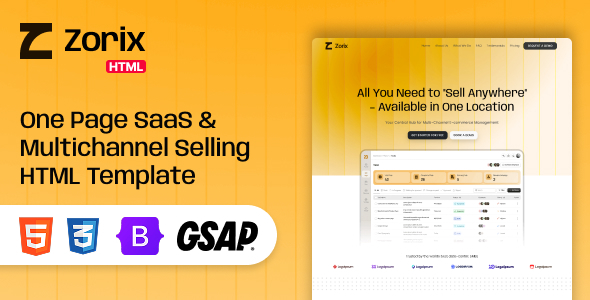
Zorix – One Page SaaS & Multichannel Selling HTML Template is a modern and professional website template designed for SaaS businesses, multichannel selling platforms, eCommerce management solutions, online retailers, and technology startups. With a contemporary design and a one-page website structure, Zorix provides a foundation for presenting software products, explaining platform capabilities, highlighting business benefits, and encouraging potential customers to explore your solution.
Whether you are launching a multichannel eCommerce management platform, developing a SaaS product for online sellers, promoting an inventory management application, or introducing a software solution for marketplace integration, Zorix can help you create a polished online presence. Its purpose-oriented design makes it suitable for businesses that want to communicate complex software offerings through an organized and engaging landing page.
As an HTML website template, Zorix provides a front-end structure that developers can customize using HTML, CSS, JavaScript, and the technologies included in the supplied package. It can serve as a starting point for a SaaS landing page, product launch website, or software marketing page without requiring you to build the entire interface from scratch.
A SaaS website needs to communicate its value quickly. Visitors should be able to understand what the product does, who it serves, and why it may be useful to their business. Zorix is intended for software companies that want to present their offerings in a clear and visually appealing format.
The one-page structure can bring important information together in a continuous browsing experience. Instead of requiring visitors to navigate through numerous separate pages, a well-organized landing page can introduce the product, explain its benefits, showcase important features, and direct users toward a suitable call to action.
The visual presentation can be customized to match your brand identity, including your logo, colors, typography, product screenshots, illustrations, and messaging. A SaaS startup may choose a minimal technology-focused appearance, while an established software company may prefer a more corporate and business-oriented presentation.
The final design should prioritize readability, straightforward navigation, and a clear explanation of the product’s value.
One-page websites are useful for businesses that want to focus attention on a single product, service, or primary conversion goal. Zorix provides a starting point for presenting essential information within one cohesive landing page.
Depending on the sections included in the template, a customized website may feature a hero banner, product introduction, feature highlights, platform benefits, workflow illustrations, testimonials, pricing information, frequently asked questions, and contact or registration calls to action.
A typical SaaS landing page might follow this structure:
The actual sections available depend on the supplied Zorix package. Additional sections can be created or existing ones modified to suit your business requirements.
Multichannel selling allows businesses to reach customers through different online sales channels. Sellers may manage their businesses across marketplaces, branded online stores, and other supported digital commerce platforms.
Zorix can be customized to promote software designed for this type of workflow. You can explain how your platform aims to help merchants organize sales activities, manage product information, and coordinate their online business operations from a more centralized environment.
For example, a SaaS company could use the landing page to explain its approach to product synchronization, catalog management, order processing, inventory visibility, and sales reporting.
A clear presentation should distinguish between features that are available today and those planned for future releases. The HTML template provides the marketing website interface; actual multichannel selling functionality must be implemented by your software product or connected services.
Software buyers often compare several products before making a decision. A well-structured feature section helps them understand the platform’s capabilities without requiring them to read lengthy technical documentation.
Zorix can serve as a foundation for presenting the main features of your SaaS application through concise descriptions, supporting visuals, icons, or product screenshots, depending on the supplied design.
Potential feature categories for a multichannel selling platform include:
Product and Catalog Management: Explain how merchants can organize product information, descriptions, images, categories, and product variants.
Inventory Management: Describe how your software helps businesses track stock levels and coordinate inventory information across supported channels.
Order Management: Present the order-related workflows available in your actual product, such as order visibility, processing, and fulfillment coordination.
Sales Analytics: Highlight reporting capabilities that help merchants understand sales performance, order trends, and other relevant business metrics.
Channel Integration: Explain which marketplaces, eCommerce platforms, or sales channels your software genuinely supports.
Workflow Automation: Describe supported automation capabilities that can reduce repetitive administrative work.
These sections should be customized to reflect your application’s real functionality rather than treating the template as a complete software platform.
A strong landing page connects product features with the problems customers want to solve. Zorix can be adapted to communicate the value proposition of a subscription-based software service, including its intended audience, use cases, and main benefits.
For example, your headline might focus on helping online sellers organize their operations across multiple channels. Supporting content can explain the challenges merchants face when managing separate product catalogs, sales reports, and order workflows.
A convincing product introduction should answer three essential questions: What does the software do? Who is it designed for? How does it help customers achieve their goals?
Use concise messaging, clear illustrations, and relevant product screenshots to support your explanation. Avoid generic claims that fail to distinguish your platform from competitors.
The landing page can also direct visitors toward actions such as starting a trial, requesting a demo, exploring pricing, joining a waitlist, or contacting the sales team. The actual behavior of these actions depends on the links and integrations implemented in the website.
For SaaS businesses, a landing page should guide visitors toward a meaningful next step. Zorix can be customized with calls to action that reflect your customer acquisition strategy.
Possible calls to action include:
The best choice depends on your product, audience, and business model. A self-service SaaS product may prioritize account registration, while an enterprise platform may focus on demo requests and consultation bookings.
Use consistent button labels and ensure each link leads to the correct destination. If a button requires account creation, payment processing, or form submission, that behavior must be connected to the appropriate backend service or external platform.
Pricing information helps potential customers evaluate whether a SaaS product fits their budget and operational needs. If suitable pricing sections are included or added to Zorix, you can present different subscription plans in a clear and comparable format.
A multichannel selling platform might offer plans based on the number of sales channels, product listings, orders, users, or supported automation features. A pricing page can describe these differences while explaining any usage limits or additional charges.
For example, a business might offer Starter, Professional, and Enterprise plans, each designed for a different level of operational complexity. These are illustrative plan structures and should be adapted to your actual service.
Ensure that pricing information is accurate and that visitors can understand billing frequency, trial conditions, plan limitations, and cancellation terms.
The HTML template does not automatically provide subscription billing or account entitlement management. These features require a suitable payment system, backend application, or SaaS billing integration.
Visual demonstrations can make software concepts easier to understand. Rather than relying exclusively on text, you can use screenshots, interface mockups, charts, workflow diagrams, and other relevant graphics to show how your application works.
Zorix can be customized with authentic product visuals that illustrate important workflows. For a multichannel selling platform, examples might include an inventory overview, product catalog screen, order dashboard, or sales analytics interface.
Screenshots should accurately represent the software being promoted. If your application is still in development, clearly identify concept visuals or previews rather than presenting them as screenshots of a fully operational product.
Use consistent image dimensions and optimize media files for web delivery. Good visual hierarchy helps visitors focus on the most important capabilities without making the page unnecessarily crowded.
SaaS customers may visit your website from desktop computers, laptops, tablets, and smartphones. A responsive layout helps ensure that your product information remains accessible across different screen sizes.
Zorix should be tested using the actual template files and customized content to verify how the page behaves on different devices. Important elements include the navigation menu, hero section, product screenshots, feature grids, pricing layouts, and call-to-action buttons.
On smaller screens, content should remain readable, images should fit the available space, and buttons should be easy to tap. Long feature descriptions and complex visual elements may need adjustments to preserve a comfortable browsing experience.
Responsive behavior should be verified in commonly used browsers after customization. Do not assume that every third-party script or newly added component will automatically work correctly on mobile devices.
A SaaS company needs a website that reflects its product identity and target market. Zorix’s HTML-based structure allows developers to customize the supplied front-end code according to the project’s requirements.
Possible customization areas include:
Developers can adapt the visual presentation to suit an early-stage startup, an established SaaS company, or a specialized multichannel commerce solution.
The precise customization process depends on the files, frameworks, and scripts included in the purchased package. Advanced components or major structural changes may require additional front-end development.
As an HTML template, Zorix is intended to provide the front-end building blocks of a website. Developers can inspect and modify the supplied files to adjust the structure, styling, and supported interactions.
HTML defines the content structure, CSS controls visual presentation, and JavaScript can provide client-side behaviors where included or implemented. This combination can be suitable for creating a lightweight marketing website that can be deployed to a compatible web hosting environment.
Before deployment, review the package’s directory structure, dependencies, asset files, documentation, and setup instructions. If the template includes a CSS framework or JavaScript library, use the versions and installation process specified by the seller.
An HTML template is not automatically a complete SaaS application. User authentication, subscription management, database storage, API integrations, real-time inventory synchronization, and order processing require separate backend development or integration with appropriate services.
Search engine optimization can help potential customers discover your SaaS product when searching for relevant software solutions. A well-organized landing page provides a useful foundation for presenting product information and targeting relevant search intent.
When customizing Zorix, use a descriptive page title, a concise meta description, a clear main heading, and logical subheadings. Explain the product in original language and include relevant terminology naturally throughout the page.
For a multichannel selling solution, content topics could include marketplace management software, product catalog synchronization, online seller workflows, inventory visibility, and eCommerce operations management, provided these topics accurately describe your offering.
Optimize images with meaningful alternative text and reasonable file sizes. Make sure links work correctly and that important content is accessible to search engines.
The template itself does not guarantee search rankings. SEO results depend on content quality, technical implementation, competition, site authority, and ongoing optimization.
A fast, accessible website creates a better first impression and helps visitors explore your product without unnecessary friction. Zorix’s performance will depend on the supplied code, image assets, external libraries, hosting environment, and custom modifications.
To improve loading performance, optimize large images, remove unused resources where appropriate, limit unnecessary third-party scripts, and test the final website with suitable performance tools.
Accessibility should also be considered during customization. Use appropriate heading levels, readable color contrast, descriptive links, alternative text for meaningful images, and keyboard-accessible navigation. Form fields should have clear labels, and interactive controls should provide understandable feedback.
Test the website with keyboard navigation and different screen sizes before launch. These checks help identify problems that might otherwise affect visitors using assistive technologies or less powerful devices.
Zorix can be adapted for several types of software and technology businesses.
Multichannel Selling SaaS: Promote software designed to help online merchants coordinate operations across supported sales channels.
eCommerce Management Platforms: Present product information, order workflows, inventory tools, and business reporting capabilities.
SaaS Startups: Introduce a new software product through a focused landing page.
Marketplace Integration Services: Explain supported connections between online stores and marketplaces.
Inventory Management Software: Showcase stock tracking and inventory-related workflows provided by your application.
Order Management Solutions: Present order processing and fulfillment features supported by your software.
Technology Companies: Use the template as a foundation for a product launch, service overview, or software marketing website.
The suitability of each use case depends on the template’s included design components and the functionality of the software being promoted.
Zorix offers a starting point for businesses that want to present a software product through a focused, modern website.
Potential benefits include:
The final benefits depend on the actual package, its included components, and the changes implemented during development.
Getting started with Zorix generally involves downloading the supplied template package, reviewing its documentation, customizing the front-end files, and deploying the website to a compatible hosting environment.
A typical setup process includes:
The exact process depends on the template’s directory structure and dependencies. Follow the seller’s instructions for any required build tools or libraries.
Zorix is a potential choice for businesses that need a dedicated landing page to introduce SaaS products or multichannel selling solutions. Its one-page approach can help organize essential product information into a single browsing experience, while the HTML foundation allows developers to adapt the supplied design to their requirements.
The template can be particularly useful when a business needs to communicate its value proposition, explain software capabilities, showcase interface visuals, and guide potential customers toward a trial, demo, or contact page.
To achieve the best results, combine the template with clear messaging, authentic product demonstrations, consistent branding, and functional conversion links. Before purchasing, review the official demo, documentation, included assets, and supported technologies to ensure that the package matches your development requirements.
Zorix – One Page SaaS & Multichannel Selling HTML Template provides a foundation for creating a professional website for SaaS businesses, multichannel commerce platforms, eCommerce management solutions, and technology startups. Its one-page format can help present a software product’s features, benefits, pricing information, and calls to action in a cohesive layout.
With thoughtful customization, optimized assets, useful product content, and appropriate integrations, developers can turn the supplied front-end design into a focused marketing website that supports product awareness and customer acquisition.
If you are launching a multichannel selling platform or promoting a SaaS product, Zorix can be a useful starting point for building your online presence. Review the seller’s official specifications and demo before purchasing, and remember that backend software capabilities must be developed separately or connected through suitable services.
1. All digital products are the most recent version, with no possibility of free updates. After payment, you can request an update to the most recent version for 5 days if a new version is released. We free support within 5 days.
2. If a license is required (Excludes WHMCS license , we provide only method not license), please contact us via email or ticket for assistance with activation. Our license is only valid for activation and does not include support.
3. We provide Mobile, PHP script installation services for $19.90 / ₹1700. Please create a backup after installation as we do not support re-installation. For mobile app source code, we do not offer installation services.
4. If you have any questions, please contact us by email [email protected] or create a ticket on this page
5. Please note that any digital products presented on the website do not contain malicious code, viruses or advertising. You will receive the original files from the developers. We do not sell any products that have been downloaded from other websites.
6. The response time can last up to 6 hours.

Iza Product Designer WordPress & WooCommerce Plugin Iza Product Designer WordPress & WooCommerce Plugin is a powerful online product customization solution that...

Brave Fire | Construct 3 | HTML5 Slot Game Brave Fire | Construct 3 | HTML5 Slot Game is a casino-inspired browser...

Lantern Hollow: Merge | HTML5 Valley Relighting Game Lantern Hollow: Merge | HTML5 Valley Relighting Game is a browser-based HTML5 game concept...

Drift Boss: Next Level | HTML5 Game Get ready for an exciting driving challenge with Drift Boss: Next Level | HTML5 Game,...
