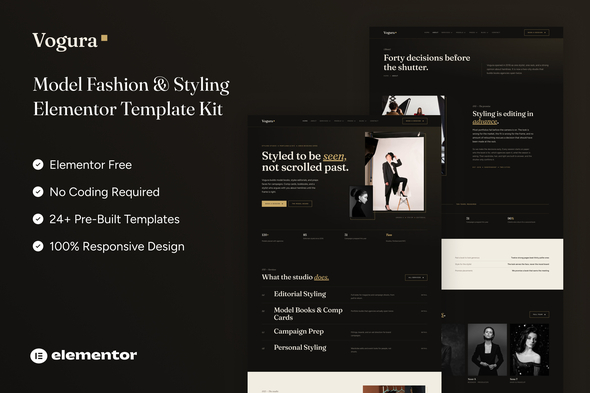
Vogura – Model Fashion & Styling Elementor Template Kit is a stylish and visually engaging website design solution created for fashion models, modeling agencies, fashion stylists, talent management companies, fashion photographers, personal stylists, and creative professionals working in the fashion industry. Designed for WordPress and Elementor, this template kit provides a convenient starting point for building a modern online presence that showcases portfolios, highlights professional experience, presents styling services, and attracts potential clients and industry collaborators. Whether you are an aspiring model building your first portfolio, an established modeling agency promoting its talent, or a fashion stylist showcasing creative projects, Vogura can help simplify website creation while allowing you to customize the design according to your personal brand and professional goals.
In the fashion industry, visual presentation plays an important role in attracting attention and communicating professional identity. Models need an effective way to showcase their portfolios, agencies need to introduce their talent, and stylists need to demonstrate their creative approach through compelling visual content.
Vogura provides a design foundation for presenting this information in a polished and organized website. Its fashion-oriented direction can be adapted to different professional needs, including individual model portfolios, modeling agency websites, styling businesses, fashion talent portfolios, and creative industry presentations.
As an Elementor Template Kit, Vogura provides pre-designed website layouts that can be customized within a compatible WordPress environment. Instead of designing every page from scratch, users can adapt the available templates, replace demonstration content, upload professional photographs, and personalize colors, typography, and page sections.
The result can be a cohesive website that communicates your style, highlights your experience, and gives visitors a convenient way to explore your work and make enquiries.
A fashion website should reflect the visual identity and creative direction of the person or business it represents. A model’s portfolio may require a minimalist editorial presentation, while a styling agency may prefer layouts that emphasize creative projects, campaign imagery, and professional services.
Vogura can be customized to support different fashion aesthetics through its available page layouts and Elementor editing workflow. With carefully selected photography, consistent typography, and a balanced content hierarchy, you can create a visual experience that places your work at the center of the website.
You can personalize the design with your own logo, preferred colors, portfolio images, professional descriptions, and brand messaging. The final appearance can be adapted to reflect editorial fashion, commercial modeling, lifestyle photography, runway work, or personal styling.
For the strongest presentation, use high-quality images that accurately represent your portfolio and maintain consistent image quality throughout the website.
Vogura is intended for use with WordPress and Elementor, a visual page builder that allows users to customize page layouts through an editing interface.
This makes the kit a useful starting point for fashion professionals who want to manage their website without manually coding every section. Depending on the included templates and available widgets, you may be able to edit text, replace images, adjust colors, modify spacing, rearrange sections, and update calls to action.
WordPress also provides a flexible environment for publishing portfolio pages, managing professional information, creating service pages, and sharing updates about fashion projects.
Before installation, check the official product documentation for the required WordPress environment, Elementor version, theme compatibility, and whether Elementor Pro or additional plugins are needed for particular layouts or features.
A professional portfolio is an important tool for models who want to present their appearance, experience, versatility, and professional identity to agencies, casting professionals, photographers, and potential clients.
Vogura can serve as a starting point for a model portfolio website that organizes photographs and professional information into a clear presentation.
Potential portfolio content includes:
The exact portfolio layouts available in the kit should be confirmed through the official product listing and live demo. However, its design can be adapted to help models present relevant information in a visually consistent format.
Use accurate professional details and obtain the appropriate permissions before publishing photographs supplied by photographers, brands, or other collaborators.
Modeling agencies need websites that communicate their brand identity, introduce represented talent, and provide a convenient way for clients to make professional enquiries.
Vogura can be adapted for agency websites that showcase models, promote agency services, and present fashion-related projects.
Potential website sections may include:
A modeling agency could organize its talent presentation by categories such as commercial modeling, fashion editorial, lifestyle modeling, or other specialties relevant to its roster.
Advanced features such as searchable model directories, talent database management, casting portals, agency accounts, and automated booking workflows may require additional plugins or custom development. These functions should not be assumed to be included in the template kit.
Fashion stylists help individuals, brands, and creative teams develop a visual identity through clothing, accessories, and coordinated looks. A professional website can communicate a stylist’s aesthetic, present previous projects, and explain available services.
Vogura can provide a foundation for websites focused on personal styling, editorial styling, wardrobe consulting, fashion campaign preparation, and creative direction.
Potential service offerings include:
These are possible applications rather than a guarantee that the kit includes dedicated layouts for each service.
You can adapt the available pages to describe your styling process, explain the types of clients you work with, and showcase completed projects. A well-organized portfolio helps prospective clients understand your creative approach before making an enquiry.
One advantage of using an Elementor Template Kit is the ability to start with prepared layouts rather than designing every page independently. The exact pages included in Vogura should be confirmed through the official product listing and live demo, but a fashion or modeling website can benefit from the following structure.
Homepage: Introduce the model, agency, or styling business and showcase selected images, services, or featured talent.
About Page: Present the professional background, creative philosophy, agency story, or personal brand identity.
Portfolio Page: Display selected photographs, editorial work, campaigns, styling projects, or modeling assignments.
Model Profile Page: Introduce an individual model through photographs and relevant professional details, where suitable layouts are available.
Services Page: Explain styling services, agency offerings, booking options, or other professional services.
Projects or Gallery Page: Organize selected work into visual collections that demonstrate creative experience.
Blog or News Page: Share fashion insights, industry updates, collaborations, behind-the-scenes content, and professional announcements.
Contact Page: Provide email details, booking enquiries, business information, and links to relevant professional social profiles.
These are recommended website applications rather than a guarantee that every layout is supplied with the kit. Check the actual template inventory before finalizing your site structure.
In fashion, visual identity can be as important as written content. A customized website helps models, stylists, and agencies communicate a distinctive style while maintaining a professional presentation.
Vogura’s Elementor-based editing workflow can support personalization of the available layouts, subject to the features included in the kit.
Customization possibilities may include:
For a fashion-focused website, consistency is particularly important. Choose images that reflect your professional direction and maintain a coherent visual style across portfolio pages.
High-quality photography is central to many fashion and modeling websites. An organized image presentation can help visitors explore a model’s versatility, understand a stylist’s aesthetic, or evaluate an agency’s talent.
With suitable layouts and compatible gallery functionality, a Vogura-based website can be adapted to present photographs in curated collections.
You might organize images by editorial shoots, commercial campaigns, runway appearances, personal styling projects, or brand collaborations. Captions and project descriptions can provide additional context without distracting from the images.
Optimize image dimensions and file sizes to balance visual quality with page performance. Use descriptive alternative text where appropriate, and ensure that photographs are displayed at suitable sizes across desktop and mobile devices.
Advanced filtering, lightbox behavior, dynamic portfolio categories, and large-scale media management may depend on the supplied templates or additional plugins.
A portfolio website should make it easy for agencies, brands, photographers, and potential clients to initiate a professional conversation.
Depending on your business model, you could include calls to action such as “Book a Model,” “Request a Collaboration,” “Explore the Portfolio,” or “Contact the Stylist.”
A contact form can collect basic enquiry information, while email links and professional social profiles provide additional communication channels. Agencies may also include talent submission instructions or details about the booking process.
If you need automated booking calendars, contract management, payment processing, or client relationship management, you may require separate software or compatible plugins. A template kit provides the design foundation, not necessarily a complete booking or talent management system.
Fashion professionals and prospective clients may browse portfolio websites from smartphones, tablets, laptops, and desktop computers. A responsive design helps ensure that photography and professional information remain accessible across different screen sizes.
When customizing Vogura, use Elementor’s responsive editing controls to check each page. Confirm that images retain suitable proportions, headings remain readable, navigation menus work correctly, and buttons are easy to tap.
Pay particular attention to image galleries and portfolio grids, which can require adjustments to spacing and column layouts on smaller screens.
Test the completed website on multiple devices before publishing it. Responsive behavior can depend on the supplied templates, WordPress theme, Elementor configuration, and additional plugins.
Search engine optimization can help models, agencies, and stylists become more discoverable online. Vogura can provide a foundation for organizing website content, but search performance depends on several factors beyond the template itself.
To support your SEO strategy, consider these practices:
For example, a stylist could create separate pages for personal styling and editorial styling, while a modeling agency could organize its website around the talent categories it represents.
An SEO plugin can help manage metadata and related settings. However, the template kit alone does not guarantee indexing, search rankings, or additional bookings.
Photography-heavy websites require careful optimization to maintain a smooth browsing experience. Large image files, videos, animations, and third-party integrations can affect loading times if they are not managed properly.
To improve performance, compress images, use appropriately sized media, avoid unnecessary plugins, choose reliable hosting, and configure caching where appropriate. Review important portfolio pages after importing the templates and adding your photographs.
Security also requires regular maintenance. Keep WordPress, Elementor, the active theme, and installed plugins updated. Use strong administrator passwords, maintain backups, and limit administrative access to authorized users.
If your website collects contact details, booking enquiries, or other personal information, configure forms appropriately and explain your data-handling practices in a suitable privacy policy.
Setting up Vogura generally involves preparing a WordPress website, installing the required page builder, and importing the supplied layouts according to the vendor’s instructions.
The exact installation process can vary according to the kit format, WordPress configuration, Elementor version, and required plugins. Follow the official documentation for product-specific instructions.
Vogura may be suitable for a variety of professionals and businesses working in fashion, modeling, and styling.
Fashion models: Create an online portfolio that presents professional photographs, experience, and contact information.
Modeling agencies: Showcase represented talent, communicate agency services, and encourage booking enquiries.
Fashion stylists: Present styling services, creative projects, and professional experience.
Fashion photographers: Adapt suitable layouts to showcase editorial, commercial, and lifestyle photography.
Talent management businesses: Establish a professional online presence for fashion-related talent and creative services.
Freelance web designers: Use the kit as a starting point for fashion website projects, subject to the applicable licensing terms.
Digital agencies: Customize the available layouts for models, styling businesses, and fashion industry clients.
Before choosing the kit, review its included templates, compatibility, licensing conditions, and any additional functionality required for your project.
Vogura should be evaluated as a website design resource rather than a complete modeling agency or talent management platform. Advanced capabilities such as searchable model databases, casting submissions, talent account management, automated booking systems, contract workflows, and payment processing may require separate plugins, external services, or custom development.
Check the official product listing and live demo to confirm the included page templates, widgets, image assets, and software requirements. Also verify whether Elementor Pro is necessary for particular layouts or features.
Review the licensing terms for any supplied images, fonts, or other assets before using them in a commercial website. Always obtain appropriate permission for portfolio photographs and collaborative work.
Vogura – Model Fashion & Styling Elementor Template Kit offers a flexible starting point for creating a stylish and professional website for fashion models, modeling agencies, stylists, photographers, and creative industry professionals. Its WordPress and Elementor-based workflow can simplify page customization and help users showcase portfolios, present services, introduce professional experience, and establish a distinctive online identity.
By combining high-quality photography, consistent branding, responsive layouts, organized portfolio sections, and clear contact options, you can adapt the available templates to support your professional goals and attract relevant opportunities.
Whether you are launching your modeling career, expanding a talent agency, promoting fashion styling services, or developing a portfolio website for a client, Vogura can help streamline the design process while providing a foundation for a visually compelling online presence.
1. All digital products are the most recent version, with no possibility of free updates. After payment, you can request an update to the most recent version for 5 days if a new version is released. We free support within 5 days.
2. If a license is required (Excludes WHMCS license , we provide only method not license), please contact us via email or ticket for assistance with activation. Our license is only valid for activation and does not include support.
3. We provide Mobile, PHP script installation services for $19.90 / ₹1700. Please create a backup after installation as we do not support re-installation. For mobile app source code, we do not offer installation services.
4. If you have any questions, please contact us by email [email protected] or create a ticket on this page
5. Please note that any digital products presented on the website do not contain malicious code, viruses or advertising. You will receive the original files from the developers. We do not sell any products that have been downloaded from other websites.
6. The response time can last up to 6 hours.

Vexium - Creative Agency Portfolio HTML Template Vexium - Creative Agency Portfolio HTML Template is a modern and visually appealing website template...
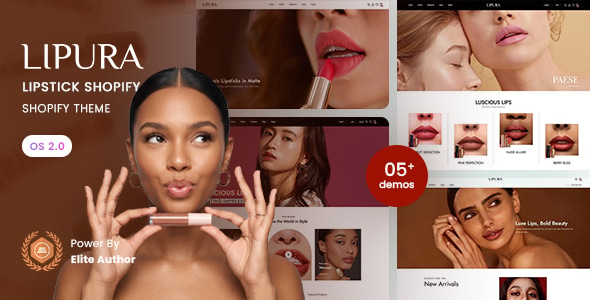
Lipura - Lipstick Shopify 2.0 Theme Lipura - Lipstick Shopify 2.0 Theme is a modern and stylish eCommerce theme designed for lipstick...
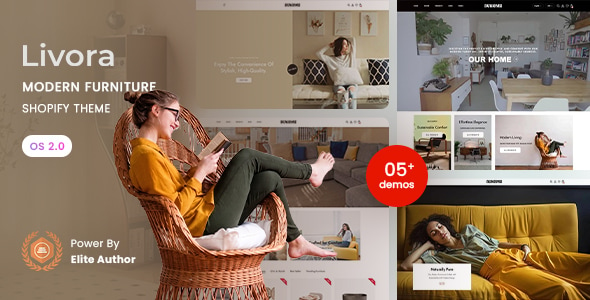
Livora - Modern Furniture Shopify 2.0 Store Livora is a modern and sophisticated Shopify 2.0 theme designed specifically for furniture stores, home...
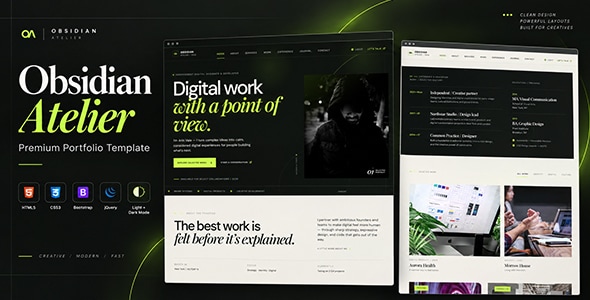
Obsidian - Creative Portfolio HTML Template Obsidian - Creative Portfolio HTML Template is a modern website template designed for creative professionals, designers,...
