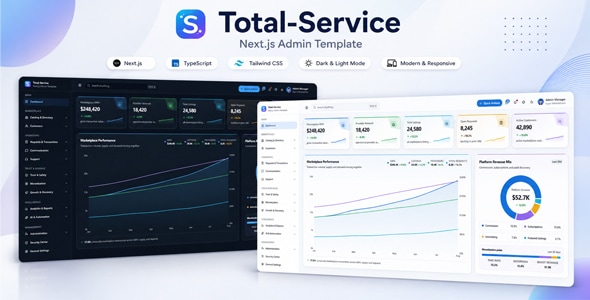
Total Service Next.js Admin Template is a modern administrative dashboard template designed for developers, businesses, and service-based organizations that need a structured interface for managing operational data, monitoring business activities, and organizing application workflows. Built around the Next.js ecosystem, this template provides a foundation for creating responsive admin panels, service management dashboards, internal business tools, and web application interfaces.
With a clean layout and a professional dashboard-oriented design, Total Service Next.js Admin Template can help simplify the development of administrative interfaces while maintaining a consistent visual experience. It is suitable for projects that require a centralized workspace for reviewing information, managing records, and organizing day-to-day business operations. Developers can adapt the interface to their specific requirements and integrate it with suitable APIs, databases, authentication systems, and backend services.
Whether you are developing a service management platform, a business administration portal, or a custom SaaS application, Total Service Next.js Admin Template offers a starting point for building a practical and customizable administrative experience.
A well-organized dashboard makes it easier for administrators to understand business activity and navigate essential application functions. Total Service Next.js Admin Template is intended to support a professional administrative interface with a structured layout and clear content organization.
An admin dashboard can bring important information, operational records, and frequently used management functions into one convenient workspace. Depending on the layouts and components included in the package, developers can organize dashboard sections around business statistics, service records, customer information, recent activities, and other relevant operational data.
The interface can be adapted to different industries by adjusting labels, navigation items, content sections, and visual styling. This flexibility makes it useful for businesses that want an administration interface aligned with their own workflows and brand identity.
Next.js is a React-based framework used to build modern web applications. Its development approach supports reusable components, structured application routing, and flexible rendering strategies, depending on the project configuration.
Total Service Next.js Admin Template provides a foundation for developers who prefer working within the Next.js ecosystem. Developers familiar with React can customize interface components, organize application views, and extend the project as their requirements evolve.
Using a framework-based template can help establish a consistent development structure from the beginning. Instead of designing every administrative screen from scratch, developers can adapt the available interface and focus more attention on the business logic, data handling, and functionality required by their applications.
The exact Next.js version, package dependencies, styling system, and included development tools should be verified in the product documentation before installation.
Service-oriented businesses often need a central place to review operational information and manage ongoing activities. Total Service Next.js Admin Template can serve as the interface foundation for these workflows when configured with the appropriate components and backend functionality.
Potential applications include service request tracking, customer record management, appointment administration, task coordination, and operational reporting. The dashboard can be customized to display the information most relevant to a particular organization.
For example, a service company could build an administrative interface for reviewing incoming requests, organizing customer details, assigning work, and monitoring progress. A software business could adapt the same general dashboard approach for managing application users, subscriptions, support requests, or internal processes.
These use cases depend on customization and integration. A dashboard template does not automatically provide a complete service management system unless the required business logic and backend features are included in the package.
Administrative applications frequently work with structured information such as customers, employees, service requests, transactions, and internal records. A well-designed interface can make this information easier to review and maintain.
Depending on the components provided, Total Service Next.js Admin Template can be adapted to display records in organized lists, tables, detail views, and other suitable layouts. Developers can configure these views to reflect the fields and workflows used by their applications.
Possible customizations include record status indicators, search fields, filtering controls, sorting options, pagination, and action menus where supported by the implementation. These features can improve usability when administrators need to work with large volumes of information.
Dynamic record management requires suitable data sources and application logic. Database connections, server-side operations, validation, permissions, and create, read, update, and delete functionality must be implemented or confirmed in the included package.
Business dashboards can provide a useful overview of operational performance by presenting relevant information in an easy-to-understand format. Total Service Next.js Admin Template can be adapted to support analytics-oriented interfaces for organizations that need to monitor activity and review business trends.
Depending on the included components, developers may be able to configure visual summaries, statistic cards, charts, and reporting sections. These areas can be used to present information such as service request volumes, customer activity, completed tasks, revenue figures, or other business-specific indicators.
A well-planned dashboard should prioritize meaningful information rather than displaying unnecessary metrics. Administrators should be able to identify important changes and access detailed records when additional investigation is needed.
Actual analytics functionality depends on the availability of chart components, the data source, and the required calculations. Real-time reporting and live metrics require appropriate backend integration and data-refresh logic.
Administrators may need to access an application from desktop computers, laptops, tablets, or mobile devices. A responsive interface helps maintain usability across different screen sizes.
Total Service Next.js Admin Template can be evaluated as a foundation for a responsive administrative experience. During customization, developers should ensure that navigation, tables, forms, charts, and dashboard sections remain practical on smaller displays.
Responsive adjustments may include simplified navigation, appropriately sized controls, scrollable data tables, flexible content layouts, and optimized spacing. The exact responsive behavior depends on the template’s implementation and should be tested across the devices and browsers relevant to the intended audience.
A mobile-friendly admin interface can be particularly useful for managers and service teams who need to review information or perform routine administrative tasks while away from their desks.
Forms are essential to many administrative applications. They allow users to create records, update information, configure settings, and submit operational data.
Where suitable form components are included, Total Service Next.js Admin Template can be customized for customer registration, service request entry, profile management, business settings, and other application workflows.
Developers can extend form interfaces with field validation, clear error messages, required-field indicators, submission feedback, and conditional inputs. Good form design helps reduce mistakes and makes administrative tasks easier to complete.
Frontend validation improves usability, but it should not replace server-side validation. Data submitted to a backend should be validated and authorized before being stored or processed.
Every business has its own visual identity and operational requirements. An adaptable admin template allows developers to modify the interface without having to create an entirely new dashboard design.
Total Service Next.js Admin Template can be customized to match a project’s branding and functionality. Depending on the available implementation, possible adjustments include colors, typography, spacing, navigation labels, logos, icons, dashboard widgets, page layouts, and content organization.
Developers can also adapt interface sections to suit different business categories, such as professional services, technical support, consulting, maintenance, logistics, or internal enterprise operations.
Before making extensive changes, review the component structure and styling conventions provided with the template. Following the existing architecture can make future updates and maintenance easier.
An administrative dashboard becomes more useful when its interface is connected to real application data. Total Service Next.js Admin Template can be used as the frontend foundation for a project that communicates with an appropriate backend.
Depending on the application’s architecture, integration may involve REST APIs, database-backed services, authentication providers, external business platforms, or custom server-side functions.
Potential integration tasks include retrieving dashboard statistics, displaying customer records, submitting forms, updating service statuses, and loading reports. Developers should establish clear data models, handle loading and error states, and ensure that sensitive information is returned only to authorized users.
The presence of a Next.js frontend does not automatically mean that a production-ready backend, database schema, or API is included. Confirm the product package and documentation to understand exactly what is supplied.
Administrative interfaces often provide access to sensitive business information. Security should therefore be treated as a core part of the complete application rather than simply a visual feature.
If authentication functionality is not included, developers can integrate a suitable authentication solution to manage sign-in, session handling, and account access. Role-based permissions can also be implemented to distinguish between administrators, managers, employees, and other user groups.
Important security considerations include server-side authorization, secure session management, input validation, protected API endpoints, and careful handling of environment variables and credentials. Access restrictions should be enforced on the server, not only by hiding navigation items or dashboard components in the frontend.
Specific authentication providers, permission systems, and security features should be verified against the actual package before purchase or implementation.
Total Service Next.js Admin Template can be adapted for a variety of administrative and business applications, depending on the available components and the developer’s implementation.
Potential project types include:
These are potential implementation scenarios, not a guarantee that every listed feature is included in the original download.
Starting with an existing dashboard interface can reduce repetitive design work and help developers establish a consistent visual system. Reusable components and a framework-based structure can also support a more organized development process when used according to the project’s conventions.
Total Service Next.js Admin Template can provide a useful starting point for developers who want to customize an administrative interface rather than create every screen independently. The amount of development time saved will depend on the completeness of the package, the quality of its documentation, and the complexity of the final application.
Before extending the project, developers should review its installation instructions, dependency versions, available components, routing structure, and recommended configuration. Maintaining compatible dependencies and testing customizations can help support long-term reliability.
Getting started with Total Service Next.js Admin Template involves reviewing the supplied files and following the installation instructions included with the product.
A typical setup process may involve:
The exact commands, supported Node.js version, environment configuration, and deployment requirements depend on the package. Follow the supplied documentation rather than assuming that every Next.js project uses identical settings.
Total Service Next.js Admin Template is intended as a development resource for creating or customizing administrative interfaces. Before purchasing, review the live preview, included files, documentation, framework compatibility, and license terms to confirm that the product matches your requirements.
The availability of specific dashboard pages, charts, tables, form libraries, authentication features, source files, and third-party integrations should be confirmed in the official package description. Additional development may be required to create a complete production application.
Also verify whether the package includes only the frontend interface or provides additional backend functionality. Hosting, domain registration, external services, premium dependencies, and custom development may involve separate costs.
Total Service Next.js Admin Template offers a starting point for developers and businesses looking to build a modern administrative dashboard within the Next.js ecosystem. Its dashboard-oriented approach can help organize business information, present operational data, and establish a consistent interface for custom web applications.
From service management and customer administration to reporting dashboards and internal business tools, the template can be adapted to different project requirements with the appropriate development and integrations. By combining the supplied interface with secure backend services, well-structured data, and thoughtful customization, developers can build an administrative experience suited to their specific workflows.
For anyone planning a Next.js-based business dashboard or service administration application, Total Service Next.js Admin Template is worth evaluating as a foundation for a tailored and maintainable web interface.
1. All digital products are the most recent version, with no possibility of free updates. After payment, you can request an update to the most recent version for 5 days if a new version is released. We free support within 5 days.
2. If a license is required (Excludes WHMCS license , we provide only method not license), please contact us via email or ticket for assistance with activation. Our license is only valid for activation and does not include support.
3. We provide Mobile, PHP script installation services for $19.90 / ₹1700. Please create a backup after installation as we do not support re-installation. For mobile app source code, we do not offer installation services.
4. If you have any questions, please contact us by email [email protected] or create a ticket on this page
5. Please note that any digital products presented on the website do not contain malicious code, viruses or advertising. You will receive the original files from the developers. We do not sell any products that have been downloaded from other websites.
6. The response time can last up to 6 hours.
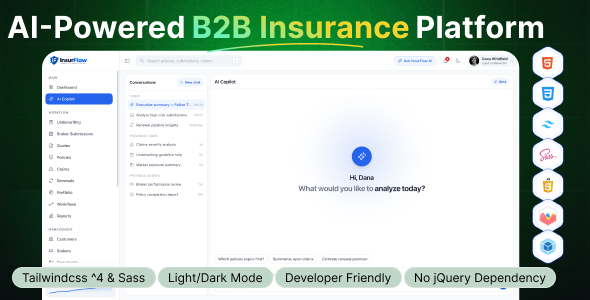
InsurFlow – AI-Powered B2B Insurance Platform HTML Template InsurFlow – AI-Powered B2B Insurance Platform HTML Template is a modern and technology-focused website...
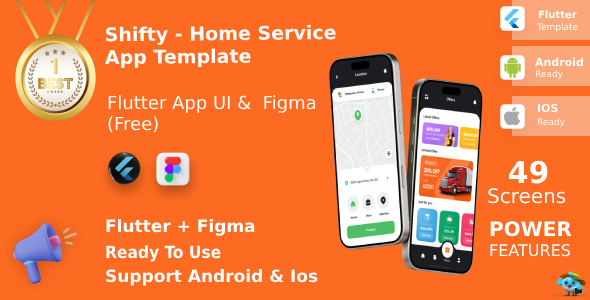
Shifty | Multi-Service Booking App UI Kit for Flutter Shifty | Multi-Service Booking App UI Kit for Flutter is a modern mobile...

Ecozone – Ecology & Environment Next.js Template Ecozone is a modern, clean, and nature-inspired Ecology & Environment Next.js Template designed for environmental...
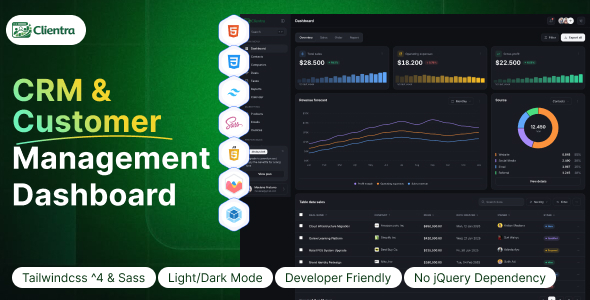
Clientra - CRM & Customer Management Dashboard HTML Template Clientra - CRM & Customer Management Dashboard HTML Template is a modern and...
