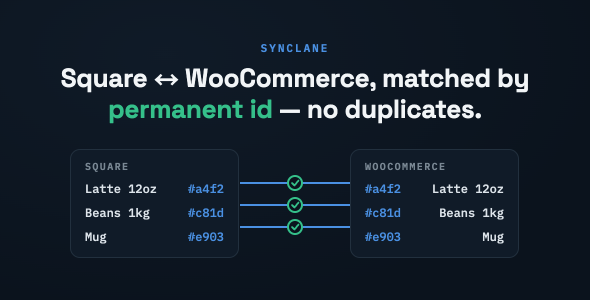
SyncLane – Square Sync for WooCommerce is a specialized WordPress plugin designed to help businesses connect their WooCommerce online store with the Square payment and business ecosystem. For merchants who manage sales through both an online store and physical retail locations, keeping product and inventory information consistent across platforms can become a time-consuming task. SyncLane aims to simplify this process by providing a synchronization solution between WooCommerce and Square.
By connecting these two popular commerce platforms, the plugin is intended to help businesses manage their products, inventory, and sales operations more efficiently. Instead of maintaining separate product records across different systems, merchants can explore a more connected workflow that reduces repetitive administration and supports better coordination between online and offline selling channels.
Whether you operate an online retail store, a physical shop, or a business that sells through multiple channels, SyncLane provides a focused integration option for building a more unified commerce management environment.
SyncLane – Square Sync for WooCommerce is a WooCommerce integration plugin focused on connecting an online store with Square. WooCommerce provides product management and online selling capabilities through WordPress, while Square offers business tools that can support payment processing and retail operations.
When these platforms are used independently, merchants may need to update product information or inventory quantities in multiple places. This can create unnecessary work and increase the possibility of inconsistent records.
SyncLane is designed to address this challenge by providing a synchronization layer between WooCommerce and Square. Depending on the available integration settings, businesses can use the connection to coordinate supported store data and maintain a more organized sales workflow.
WooCommerce and Square Integration
The plugin focuses on connecting WooCommerce with Square, allowing merchants to explore a more coordinated commerce setup. This is particularly useful for businesses that already use WooCommerce for online sales and Square for other business operations.
Product Synchronization
Maintaining product information across multiple platforms can be difficult when catalogs change frequently. SyncLane is designed to support product synchronization between connected systems, subject to the specific fields and synchronization direction supported by the plugin.
Inventory Management Synchronization
Inventory consistency is important for businesses selling products both online and in physical stores. A synchronization integration can help coordinate supported stock information between WooCommerce and Square, reducing the need for repeated manual updates.
Centralized Commerce Workflow
Using connected systems can help merchants manage different sales channels with less administrative effort. Rather than treating online and offline operations as completely separate processes, businesses can work toward a more connected product and inventory management workflow.
Reduced Manual Administration
Manually updating product details and stock quantities in multiple platforms takes time. Synchronization tools can help reduce repetitive tasks and make routine store management more efficient.
Support for Omnichannel Retail
Businesses that sell through websites, retail stores, and other supported sales channels can benefit from a connected commerce environment. SyncLane is intended for merchants who want to coordinate their WooCommerce and Square operations.
WooCommerce-Based Management
The plugin extends a familiar WordPress and WooCommerce environment, making it relevant to store owners who already manage their online catalogs through WooCommerce.
Keep Online and Offline Operations Connected
Businesses that use WooCommerce and Square may otherwise need to maintain separate records. A synchronization solution can help bring supported information together and create a more consistent operating process.
Improve Inventory Accuracy
When stock information is maintained across multiple sales channels, outdated quantities can lead to overselling or missed sales opportunities. Inventory synchronization can help reduce this risk when properly configured and supported by both systems.
Save Time on Product Updates
Merchants frequently add products, update descriptions, change prices, or adjust stock levels. A connected workflow can reduce the need to repeat the same updates across separate platforms.
Support Business Growth
As a business expands from online-only sales to physical retail or additional channels, managing product information becomes more complicated. Integrating WooCommerce with Square can help establish a more manageable foundation for multi-channel operations.
Reduce Operational Complexity
A well-configured integration can reduce repetitive administration and help staff focus on customer service, product management, marketing, and business development.
Retail Stores with Online Shops
A retailer operating a physical store and a WooCommerce website can use an integration to coordinate supported product and inventory information across both environments.
Fashion and Clothing Businesses
Clothing retailers often manage products with multiple sizes, colors, and variations. Synchronization can help coordinate supported catalog and stock information, depending on the plugin’s variation-handling capabilities.
Electronics and Accessories Stores
Electronics retailers frequently update product availability and pricing. A connected WooCommerce and Square workflow can help reduce duplicate product administration.
Home and Lifestyle Retailers
Businesses selling furniture, home accessories, and lifestyle products can benefit from a more coordinated approach to managing online and physical inventory.
Multi-Channel Merchants
Companies selling through a WooCommerce website alongside Square-supported retail operations can explore synchronization as a way to improve consistency between their sales environments.
WooCommerce and Square serve different but complementary roles in a modern commerce environment.
WooCommerce provides a flexible online selling platform where businesses can manage product pages, categories, customer interactions, and website-based orders. Square offers business and payment tools that can support in-person and other commerce activities.
Using both systems can be beneficial, but disconnected product records and inventory information may create unnecessary work. An integration such as SyncLane is intended to help bridge this gap by coordinating supported information between the platforms.
For businesses operating across multiple sales channels, this type of connection can make day-to-day store management more organized and efficient.
Before installing SyncLane – Square Sync for WooCommerce, review its official documentation and verify the supported versions of WordPress, WooCommerce, and Square. Confirm the authentication process, account requirements, supported data types, and synchronization settings.
Pay particular attention to the following areas:
Not every WooCommerce and Square integration supports the same features. Do not assume that every product field, order, customer record, or payment transaction is synchronized unless the plugin documentation explicitly confirms it.
For a production store, test the integration with a small product catalog first. Verify stock changes, product updates, and order workflows before enabling synchronization across the entire business.
SyncLane – Square Sync for WooCommerce may be suitable for:
It is particularly relevant to merchants who want to connect their WooCommerce product management workflow with their existing Square-based business operations.
SyncLane – Square Sync for WooCommerce is designed to help businesses connect WooCommerce with Square and explore a more coordinated approach to managing online and offline commerce. By focusing on synchronization between the two platforms, it can help reduce repetitive product administration, improve supported inventory workflows, and create a more organized multi-channel retail environment.
For merchants using WooCommerce to operate an online store alongside Square-supported retail activities, this type of integration can be a valuable addition to their business toolkit. Review the official documentation for exact synchronization capabilities, supported product data, and setup requirements before using it in a live store.
1. All digital products are the most recent version, with no possibility of free updates. After payment, you can request an update to the most recent version for 5 days if a new version is released. We free support within 5 days.
2. If a license is required (Excludes WHMCS license , we provide only method not license), please contact us via email or ticket for assistance with activation. Our license is only valid for activation and does not include support.
3. We provide Mobile, PHP script installation services for $19.90 / ₹1700. Please create a backup after installation as we do not support re-installation. For mobile app source code, we do not offer installation services.
4. If you have any questions, please contact us by email [email protected] or create a ticket on this page
5. Please note that any digital products presented on the website do not contain malicious code, viruses or advertising. You will receive the original files from the developers. We do not sell any products that have been downloaded from other websites.
6. The response time can last up to 6 hours.
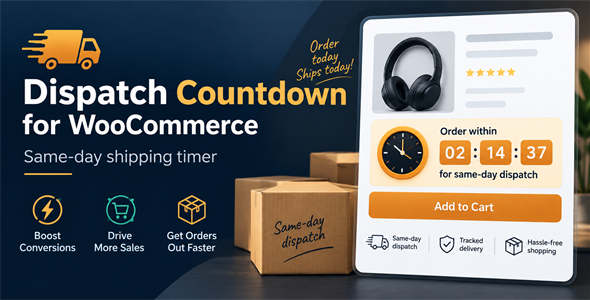
Dispatch Countdown for WooCommerce Dispatch Countdown for WooCommerce is a powerful WooCommerce plugin designed to increase customer confidence and boost conversions by...

WooCommerce Photo & Video Reviews + Q&A Discussions WooCommerce Photo & Video Reviews + Q&A Discussions is a powerful customer engagement plugin...
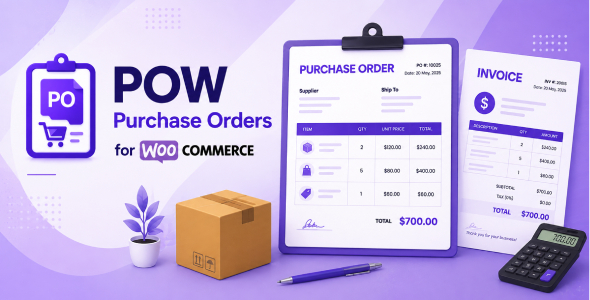
POW - Purchase Orders for WooCommerce POW - Purchase Orders for WooCommerce is a comprehensive procurement and inventory management plugin designed to...
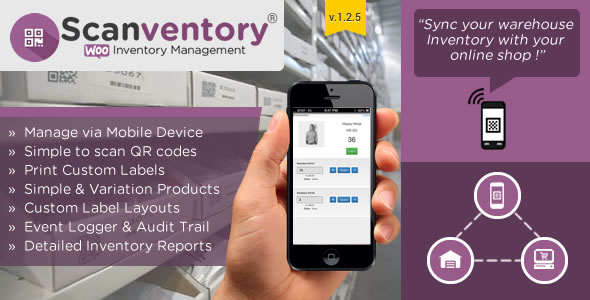
Scanventory - Inventory Manager & Label Generator for WooCommerce Scanventory is a powerful inventory management and label generation plugin for WooCommerce designed...
