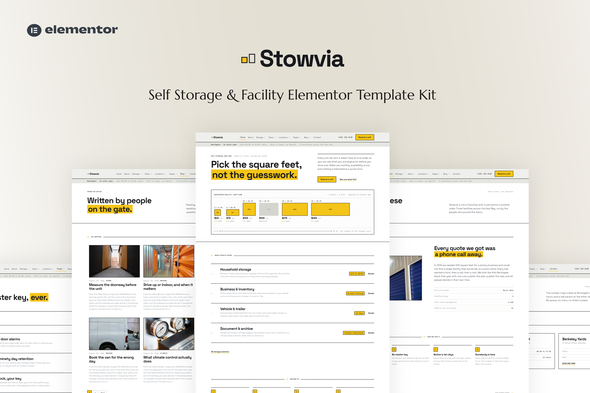
Stowvia – Self Storage & Facility Elementor Template Kit is a professional website design kit intended for self-storage businesses, storage facility operators, warehouse rental providers, moving and storage companies, and businesses offering secure storage solutions for personal and commercial belongings. Designed for WordPress and Elementor, Stowvia provides a customizable foundation for presenting storage services, introducing facility features, explaining rental options, and encouraging customers to make inquiries. Its storage-focused purpose makes it suitable for businesses that want to establish a professional online presence, communicate their available solutions, and help customers find appropriate storage options for their needs.
Self-storage facilities serve customers who need additional space for household belongings, business inventory, seasonal items, furniture, documents, and other possessions. Customers often compare storage providers based on unit sizes, accessibility, security arrangements, rental terms, location, and pricing before choosing a facility.
Stowvia is designed around the needs of the storage industry, providing a starting point for businesses that want to present their services and facility information through a structured website.
The kit can be adapted for personal storage companies, commercial storage providers, warehouse rental businesses, moving and storage services, document storage facilities, and operators offering flexible storage solutions.
By organizing information about storage options, facility features, rental procedures, and contact details, a business can help potential customers understand its offerings and take the next step toward requesting a unit or consultation.
As an Elementor Template Kit, Stowvia should primarily be understood as a collection of website layouts and design assets rather than a complete storage management application. Features such as live unit availability, online reservations, recurring billing, customer accounts, and facility access control require appropriate integrations or backend development unless explicitly included in the supplied package.
A storage facility website should communicate reliability, convenience, and confidence in the business’s services. Stowvia provides a storage-focused design foundation that can be customized to reflect a company’s brand identity and customer requirements.
The website can be adapted to present storage solutions, explain rental conditions, showcase facilities, and direct visitors toward inquiries or reservation requests.
Developers can customize the logo, colors, typography, photographs, navigation, and page content to match the business’s positioning. A personal storage provider may emphasize convenience and household organization, while a commercial storage business may focus on inventory capacity and flexible space.
The exact layouts, visual components, and interactive features should be verified through the official demo and supplied documentation.
Storage businesses often serve several customer groups, each with different space and access requirements. A clearly organized services section can help visitors identify the right type of storage.
Stowvia can be customized to present services such as:
These examples represent possible content categories rather than a guarantee that the kit includes dedicated layouts for every service.
Each service description can explain the intended use, typical customer requirements, available options, and relevant rental conditions. Clear service information helps customers understand whether the facility matches their storage needs.
Customers often need to estimate how much storage space they require before renting a unit. A dedicated unit information section can help explain the available sizes and their potential uses.
Depending on the business’s actual offerings, storage options might include compact units for boxes and small belongings, medium units for furniture, or larger spaces for household contents and business inventory.
A storage unit presentation can include:
These details should accurately reflect the facility’s real inventory and policies.
If Stowvia includes storage service or pricing layouts, they can be adapted to display this information. Dynamic unit availability, automated size recommendations, and inventory management require additional functionality unless explicitly provided.
Customers want to understand how a storage facility operates and what measures are used to protect their belongings.
A facility information section can present relevant features such as access arrangements, lighting, surveillance systems, site management, and other security provisions that the business actually offers.
Other facility details may include loading areas, vehicle access, elevators, climate-controlled units, and extended access hours where available.
Accurate descriptions help customers compare facilities and understand the services included in their rental agreement.
Security claims should reflect the actual facility’s equipment and procedures. A website template can present this information, but it does not itself provide physical security or facility monitoring.
Transparent pricing helps customers understand the expected cost of renting storage space.
Stowvia can be adapted to display storage rental options, price information, and the conditions associated with different unit types.
Depending on the business model, pricing information may include monthly rental rates, deposits, promotional offers, minimum rental periods, additional service charges, and applicable taxes.
A pricing section can also explain what customers should consider before choosing a unit, including the required space, access frequency, and expected rental duration.
If the business uses variable pricing, discounts, or location-specific rates, those details should be presented accurately.
Displaying a rental price does not automatically calculate invoices, collect payments, or enforce recurring billing. Those functions require an appropriate payment provider and backend system unless already included.
Storage customers often prioritize convenience when choosing a facility. A location section can help visitors identify where a business operates and how to contact the relevant branch.
Stowvia can be customized to display facility addresses, telephone numbers, email addresses, operating hours, and directions.
For businesses with multiple branches, location-specific pages can present the available services and contact details for each facility.
Map integrations may also help customers understand the location and plan a visit, depending on the selected service and implementation.
Live location-based unit availability, branch-specific inventory, and automated location selection require additional functionality where they are not already provided.
A convenient inquiry process can help convert website visitors into prospective customers.
Stowvia can be adapted to provide contact options or a rental inquiry form that collects information such as the customer’s name, contact details, preferred storage type, approximate space requirements, and intended rental period.
For example, someone moving to a new home may need temporary furniture storage, while a small business may require space for excess inventory.
A well-designed inquiry process can help the storage provider understand the customer’s requirements and recommend an appropriate option.
However, a visible form does not automatically create a reservation. Form submissions require a functioning submission handler, email service, backend, or suitable third-party integration.
Real-time unit selection, reservation confirmation, automated notifications, and rental contract generation should be verified separately unless explicitly included in the supplied package.
Customers often have questions about storage preparation, access arrangements, rental terms, and the types of items they can store.
A frequently asked questions section can help address these concerns before a customer contacts the facility.
Potential topics include:
The information should be consistent with the facility’s actual policies, rental agreements, and applicable regulations.
A well-organized FAQ section can reduce repetitive inquiries and help customers prepare for the rental process.
Elementor provides a visual website-building environment that allows users to edit compatible WordPress page layouts through a graphical interface.
Stowvia’s Template Kit format can provide a starting point for customizing supported pages and design sections without constructing every layout from scratch.
Depending on the supplied templates and dependencies, customization may include updating headings, photographs, service cards, pricing sections, contact information, and other visual elements.
This workflow can be useful for storage business owners and web developers who want to adapt the website to their branding and service offerings.
The exact Elementor version, required widgets, and installation process should be confirmed in the official documentation.
WordPress can provide a content management foundation for updating storage service descriptions, facility information, rental guidelines, and other business content.
With appropriate templates and plugins, the website can also support location-specific pages, service information, blog articles, and customer resources.
For example, a storage provider could publish guides on packing furniture, organizing household belongings, preparing items for storage, and choosing an appropriate unit size.
The kit itself should not be assumed to include a custom storage inventory database or an administrative system for managing rental contracts.
Storage businesses vary in their target markets and service models. Some focus on household storage, while others serve commercial customers, businesses, or customers requiring specialized storage facilities.
Stowvia can be adapted to reflect these differences through branding, imagery, service descriptions, pricing information, and navigation.
Potential customization tasks include:
A consistent visual identity can help the business maintain a professional presentation across its website.
Storage businesses may require functionality beyond the supplied website layouts.
Potential integrations include contact form plugins, map services, appointment scheduling tools, analytics platforms, email marketing systems, payment providers, and customer relationship management software.
A more advanced storage platform could also connect to a custom backend for unit inventory, reservations, customer accounts, and recurring rental payments.
These are optional integration possibilities rather than guaranteed built-in features of Stowvia. Plugin compatibility, licensing, and technical requirements should be checked before implementation.
Stowvia may be suitable for several types of storage and facility providers.
Self-storage companies: Present storage units, facility information, rental options, and inquiry details.
Household storage providers: Explain solutions for furniture, seasonal belongings, and temporary storage needs.
Commercial storage businesses: Promote space for business inventory, equipment, and operational supplies.
Warehouse rental operators: Present available facility types and information for businesses requiring storage space.
Moving and storage companies: Introduce storage services that complement relocation and moving operations.
Document storage providers: Communicate document and archive storage services, subject to the facility’s actual capabilities and security arrangements.
Facility operators and web developers: Use the Elementor-based design foundation to create customized websites for storage-related businesses.
The final suitability depends on the supplied layouts, required plugins, and the additional functionality needed by the business.
Customers may search for storage facilities from desktop computers, tablets, and smartphones. A responsive website helps visitors explore services, compare options, and find contact details across different screen sizes.
When evaluating Stowvia, test the supplied layouts for responsive navigation, readable text, properly scaled images, pricing tables, and usable inquiry forms.
Important rental information should remain easy to find on mobile devices, particularly contact details, operating hours, facility locations, and inquiry options.
Accessibility should also be considered during customization. Clear headings, sufficient color contrast, descriptive image alternatives, keyboard-accessible controls, and properly labeled forms can improve usability for a wider audience.
Responsive behavior and accessibility should be verified through testing rather than assumed from the template title.
Website performance and search visibility can help storage businesses reach customers searching for available space in their area.
Storage websites may include multiple facility photographs, maps, and service sections, so efficient asset handling is important.
Recommended optimization practices include:
Businesses operating in multiple locations may benefit from separate pages containing accurate information about each facility and the services available there.
A template alone does not guarantee search rankings. Results depend on technical implementation, content quality, local competition, and ongoing optimization.
A WordPress website should be maintained regularly to help protect business content and ensure reliable operation.
Recommended practices include keeping WordPress, Elementor, the active theme, and plugins updated; using strong administrator credentials; enabling HTTPS; maintaining backups; and limiting administrative access to authorized users.
Contact forms should be configured with appropriate validation and spam protection. Customer information should be handled according to the business’s privacy obligations.
If online rental payments or customer accounts are introduced, additional security measures will be needed to protect account access, reservation records, and transaction workflows.
Third-party plugins should be selected carefully, with attention to compatibility, ongoing maintenance, and licensing.
Regular updates and testing can help maintain the website as the business’s services and facility information evolve.
Installing an Elementor Template Kit generally involves preparing a compatible WordPress environment and importing the supplied layouts according to the official instructions.
A typical setup process may include:
Some kits require Elementor Pro or additional plugins for specific widgets and layouts. A compatible WordPress theme may also be necessary because a template kit is generally not a standalone theme.
Always consult the official documentation to confirm supported versions, required plugins, and installation instructions.
Stowvia may be suitable for:
Self-storage facility operators: Build a professional website to explain storage options and rental arrangements.
Commercial storage providers: Present solutions for business inventory, equipment, and supplies.
Warehouse rental companies: Communicate facility information and space rental options.
Moving and storage businesses: Promote storage services alongside relocation support.
Local storage businesses: Make facility details and contact information easier for nearby customers to find.
WordPress developers and digital agencies: Use an Elementor-based foundation to create storage and facility websites for clients.
Before choosing the kit, review its included templates, plugin requirements, licensing terms, compatibility, and customization options.
Stowvia – Self Storage & Facility Elementor Template Kit provides a customizable website design foundation for self-storage companies, warehouse rental providers, moving and storage businesses, and other facility operators.
Its intended purpose is to help businesses present storage solutions, explain rental options, showcase facilities, communicate security information, and encourage customers to submit inquiries.
The WordPress and Elementor workflow can simplify visual customization, while the kit’s layouts provide a starting point for building a consistent storage business website without designing every page from scratch.
Features such as live unit availability, online reservations, recurring payments, customer portals, and automated rental management require suitable plugins, integrations, or custom development unless explicitly included.
For storage businesses and web developers seeking a flexible website foundation, Stowvia is worth evaluating against the project’s branding requirements, technical setup, and operational needs. Reviewing the official demo, included templates, documentation, and licensing terms will help determine whether the kit is appropriate for the intended website.
1. All digital products are the most recent version, with no possibility of free updates. After payment, you can request an update to the most recent version for 5 days if a new version is released. We free support within 5 days.
2. If a license is required (Excludes WHMCS license , we provide only method not license), please contact us via email or ticket for assistance with activation. Our license is only valid for activation and does not include support.
3. We provide Mobile, PHP script installation services for $19.90 / ₹1700. Please create a backup after installation as we do not support re-installation. For mobile app source code, we do not offer installation services.
4. If you have any questions, please contact us by email [email protected] or create a ticket on this page
5. Please note that any digital products presented on the website do not contain malicious code, viruses or advertising. You will receive the original files from the developers. We do not sell any products that have been downloaded from other websites.
6. The response time can last up to 6 hours.
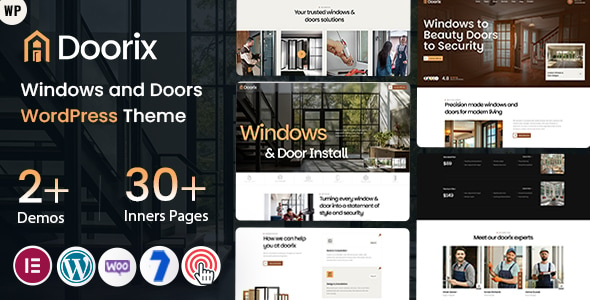
Doorix - Windows and Doors WordPress Theme Doorix is a modern and professionally crafted Windows and Doors WordPress Theme designed for window...
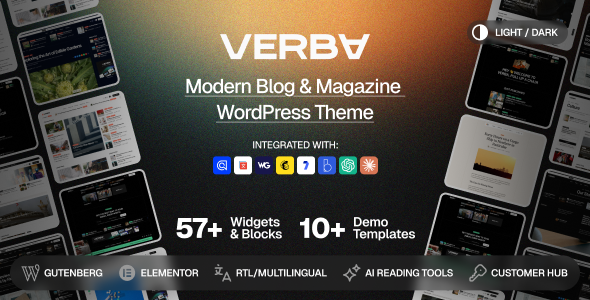
Verba – Modern Blog & Magazine WordPress Theme Verba – Modern Blog & Magazine WordPress Theme is a modern, elegant, and versatile...
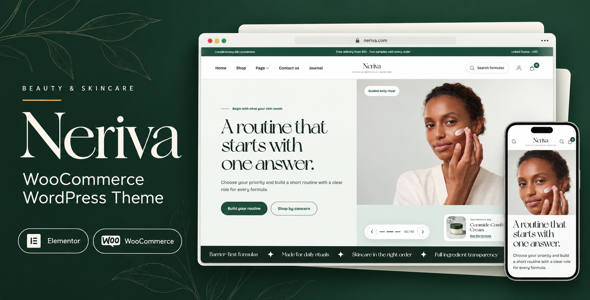
Neriva - Beauty & Skincare WooCommerce Theme Neriva is a modern, elegant, and conversion-focused Beauty & Skincare WooCommerce Theme designed for beauty...
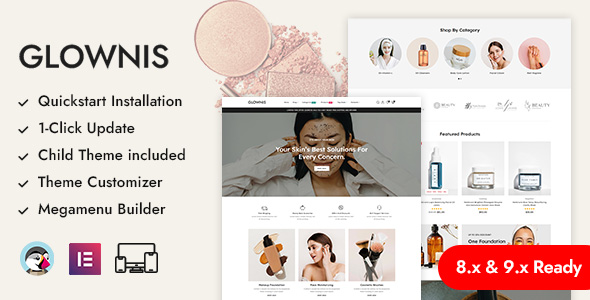
Glownis - Beauty Salon & Cosmetics Shop Prestashop Responsive Theme Glownis - Beauty Salon & Cosmetics Shop Prestashop Responsive Theme is a...
