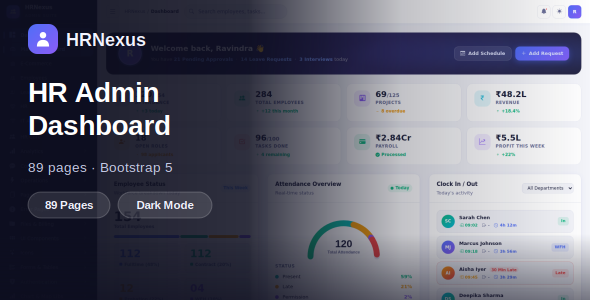
HRNexus — Bootstrap 5 HR & Admin Dashboard UI Kit is a modern user interface kit designed for human resource management systems, employee administration platforms, business dashboards, and internal management applications. Built around the Bootstrap 5 framework, HRNexus provides a structured frontend foundation for developers who want to create professional HR software and administrative interfaces with a consistent design.
Human resource departments manage a wide range of activities, including employee records, recruitment, attendance, leave requests, payroll coordination, and performance reviews. A well-organized dashboard helps present this information in a clear and accessible format. HRNexus can serve as a starting point for designing interfaces that simplify these workflows and support a more organized employee management experience.
Whether you are developing an HR management system, an employee self-service portal, a recruitment platform, or a general business administration dashboard, this UI kit can be customized to suit your project’s requirements.
HR software needs a clear interface that helps administrators and employees access relevant information without unnecessary complexity. HRNexus is intended for HR and administrative applications, making it suitable for projects that require organized navigation, information panels, forms, tables, and other common dashboard elements.
A structured dashboard can help users review important information, navigate between management sections, and complete routine tasks more efficiently. You can customize the interface to reflect your organization’s workflows, branding, and user requirements.
For example, an HR dashboard could display employee summaries, recruitment activity, leave request information, or workforce statistics. An administrator dashboard could organize account management, system settings, and business information into separate sections.
The exact pages, components, and features depend on the included package. Review the official demo and documentation to confirm the available layouts and UI elements.
HRNexus uses Bootstrap 5, a popular frontend framework that provides a responsive grid system and reusable interface components.
Bootstrap 5 helps developers create consistent layouts across different screen sizes. Its utility classes and component patterns can also simplify the process of customizing spacing, typography, buttons, forms, navigation, and other interface elements.
For HR applications, this can be useful when designing pages that contain multiple information sections, employee tables, administrative forms, and dashboard cards.
Developers can adapt the supplied HTML, CSS, and JavaScript to meet the requirements of their project. They can also extend the existing interface with custom components and additional pages.
Before installation, check the documentation for the Bootstrap version, dependencies, included source files, and setup requirements. Compatibility with other frontend libraries will depend on the supplied implementation and your project’s architecture.
HRNexus can provide a starting point for a variety of employee management and administrative applications.
Potential use cases include:
These are potential applications rather than a guarantee that every module is included. The actual functionality depends on the supplied UI kit and any additional development.
Administrative dashboards often bring together information from different parts of an organization. A clear presentation helps users identify important details and navigate to the relevant management screens.
Depending on the included package, HRNexus may provide dashboard layouts, information cards, tables, forms, navigation components, and other common UI patterns.
You can customize these elements to present employee counts, department summaries, recruitment activity, attendance information, or other business metrics. If the kit includes chart components, you may also adapt them to display workforce statistics and reporting data.
For a functional application, the dashboard must receive data from an appropriate source. Developers can connect the interface to a backend API or database-driven application to display current employee records and business information.
Sample values in a UI template should not be treated as live organizational data. Real-time updates, reporting calculations, filtering, and data synchronization require suitable implementation unless explicitly included in the package.
Employee information is an important part of many HR applications. Organizations may need to manage employee profiles, department assignments, job titles, contact information, and other employment-related details.
HRNexus can serve as a frontend foundation for creating interfaces that present this information in a structured format.
Developers can adapt the available forms and tables to support employee record screens, profile views, search interfaces, and administrative actions. Additional fields can be added to match the organization’s requirements.
A complete employee management system also requires backend operations for creating, updating, retrieving, and deleting records. These operations should include appropriate validation, authorization, and error handling.
Because employee records may contain sensitive personal information, the final application should enforce access controls and protect data from unauthorized access. A UI kit provides the visual starting point, not a complete security or data management solution.
Recruitment teams often work with job openings, candidate information, application statuses, interview schedules, and hiring decisions.
HRNexus can be adapted to create recruitment-related screens if the supplied layouts support these requirements or if developers add the necessary components.
A recruitment interface might organize candidate records, display job information, and provide a clear overview of application progress. It could also include forms for entering candidate details and tables for reviewing applications.
Advanced recruitment functionality, such as resume uploads, automated candidate notifications, interview scheduling, and applicant tracking, requires additional development unless explicitly included in the package.
When implementing recruitment features, ensure that candidate information is stored securely and that access is limited to authorized users.
Attendance and leave workflows are common requirements for HR software. Employees may need to submit leave requests, while managers need interfaces for reviewing requests and tracking attendance information.
HRNexus can provide a foundation for designing these screens and organizing related information.
Potential interface elements include attendance tables, leave request forms, approval screens, calendar views, and summary cards. The exact elements available depend on the purchased package.
For these interfaces to work with real business processes, developers must implement the necessary backend rules. For example, a leave management system may need to validate available leave balances, apply approval policies, and record decisions.
Similarly, attendance calculations require reliable time records and clearly defined business rules. Integrations with biometric devices, attendance systems, or payroll software may require separate APIs or services.
The UI kit can support the presentation layer, while the underlying workflow logic must be implemented and tested separately.
HR teams and employees may access administrative applications from desktop computers, laptops, tablets, and smartphones. A responsive interface helps ensure that important information remains accessible across different screen sizes.
Bootstrap 5 provides a responsive grid system that can help developers adapt layouts to different devices. HRNexus can serve as a starting point for building responsive administrative screens, depending on its implementation.
When customizing the kit, test navigation menus, data tables, forms, dashboard cards, and interactive controls on common screen sizes. Tables containing many columns may require responsive containers or alternative mobile layouts.
Make sure that buttons and form fields remain easy to use on touchscreens. Important information should also remain readable without excessive scrolling or horizontal movement.
Responsive behavior depends on the supplied code and any changes made during development, so test the finished application before deployment.
Different organizations have different HR policies, reporting requirements, and administrative workflows. HRNexus can be customized to reflect these differences.
You can change the color palette, typography, logos, navigation structure, and interface elements to align with your company’s branding. You can also reorganize pages and add custom sections as the application evolves.
A business may prioritize employee records and attendance, while another may focus on recruitment and workforce reporting. Customizing the interface helps keep the most relevant features accessible to each audience.
Developers can also adapt the UI kit for integration with an existing backend or frontend architecture, subject to its source structure and dependencies.
Before making significant changes, review the available components, stylesheets, JavaScript files, and documentation. Maintaining consistent styling and reusable components can make future updates easier.
A UI kit provides the interface that users see, but a functional HR application also needs systems to store data, apply business rules, and manage user actions.
HRNexus can serve as a frontend foundation for connecting administrative screens to a backend built with technologies such as Laravel, Node.js, PHP, or another compatible framework.
Potential development tasks include:
These capabilities require additional development unless explicitly included in the purchased package.
For production applications, implement server-side authorization rather than relying only on hiding interface elements. Validate incoming data, protect sensitive records, and use secure authentication practices.
Search engine optimization is generally more relevant when HRNexus is used to build a public-facing website, product landing page, or software marketing site. Private administrative dashboards usually prioritize usability, security, and application performance instead of public search visibility.
For public pages, use descriptive titles, clear headings, meaningful content, and appropriate metadata. Review image sizes, remove unnecessary assets, and test loading performance.
For application dashboards, focus on efficient rendering, readable layouts, accessible controls, and reliable API communication. The final performance depends on the implementation, the amount of data displayed, and any external libraries or services used.
A template can provide a starting point for a well-structured interface, but it cannot guarantee specific SEO results or application performance without proper configuration and testing.
HRNexus may be suitable for HR software developers, SaaS founders, enterprise application teams, web development agencies, freelancers, and businesses building employee administration systems.
Developers can use it to accelerate frontend design work, while organizations can adapt the interface to support internal management applications.
It is especially relevant to projects that need a Bootstrap 5-based UI foundation for HR workflows, employee records, recruitment interfaces, or general administrative dashboards.
Before purchasing, review the official demo, included pages, supported browsers, dependencies, documentation, licensing terms, and source files. Confirm whether the package includes editable HTML, CSS, JavaScript, and any additional libraries required to run the interface.
HRNexus is a UI kit for frontend development. Its exact features depend on the contents of the purchased package.
Do not assume that a working HR management backend, employee database, payroll engine, authentication system, recruitment workflow, or attendance integration is included unless the product documentation explicitly confirms it.
These functions may require a backend application, database, APIs, and additional development. Before deploying an HR system, test all workflows and ensure that sensitive employee information is protected through appropriate access controls and security measures.
HRNexus — Bootstrap 5 HR & Admin Dashboard UI Kit offers a practical starting point for creating modern human resource management interfaces and administrative applications.
With customized branding, organized dashboard components, responsive layouts, and suitable backend integrations, developers can adapt the UI kit to a wide range of HR and business management requirements.
If you are building an employee management system, recruitment platform, HR SaaS product, or internal administration dashboard, HRNexus can help establish the frontend foundation for your next project.
1. All digital products are the most recent version, with no possibility of free updates. After payment, you can request an update to the most recent version for 5 days if a new version is released. We free support within 5 days.
2. If a license is required (Excludes WHMCS license , we provide only method not license), please contact us via email or ticket for assistance with activation. Our license is only valid for activation and does not include support.
3. We provide Mobile, PHP script installation services for $19.90 / ₹1700. Please create a backup after installation as we do not support re-installation. For mobile app source code, we do not offer installation services.
4. If you have any questions, please contact us by email [email protected] or create a ticket on this page
5. Please note that any digital products presented on the website do not contain malicious code, viruses or advertising. You will receive the original files from the developers. We do not sell any products that have been downloaded from other websites.
6. The response time can last up to 6 hours.
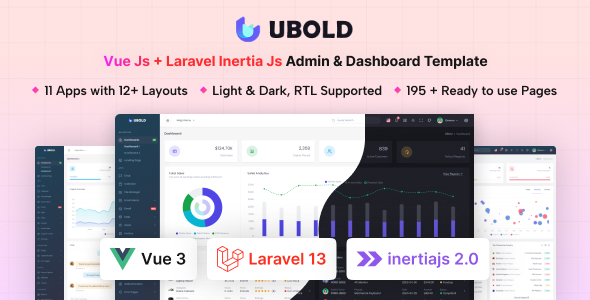
UBold - Vue + Laravel Inertia Js Tailwind CSS Admin Dashboard Template UBold is a powerful and modern admin dashboard template built...

Edustray - University, Online Courses, School & Education HTML Template Edustray is a modern and professionally designed HTML template created for universities,...
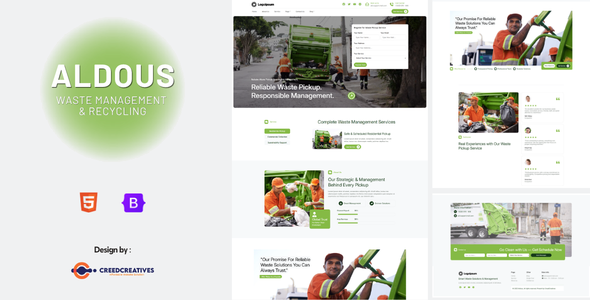
Aldous – Waste Pickup & Management HTML Bootstrap Template Aldous is a modern, professional, and environmentally focused Waste Pickup & Management HTML...
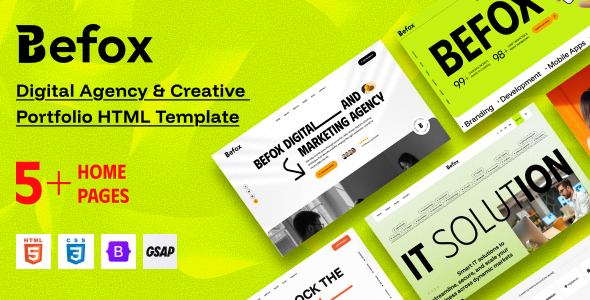
Befox - Digital Agency & Creative Portfolio HTML Template Befox is a modern and professionally crafted HTML template designed for digital agencies,...
