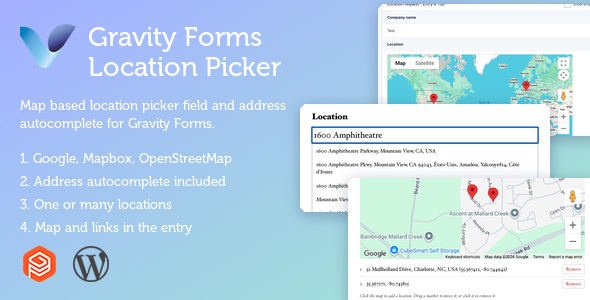
Gravity Forms Location Picker & Address Autocomplete is a powerful WordPress plugin designed to enhance Gravity Forms by adding advanced location selection, address autocomplete, interactive maps, geolocation functionality, and accurate address data collection. The plugin helps businesses streamline form submissions by allowing users to quickly search, select, and verify addresses through an intuitive location-based interface.
Whether you’re managing delivery services, booking platforms, real estate websites, service provider businesses, local directories, event registrations, logistics companies, customer onboarding forms, appointment booking systems, or lead generation websites, Gravity Forms Location Picker & Address Autocomplete provides a seamless solution for collecting precise location information directly within Gravity Forms.
The plugin improves user experience by reducing manual address entry errors, speeding up form completion, and ensuring accurate location data collection. With map integration and address suggestions, users can quickly select locations while businesses receive reliable address information for operational efficiency.
• Gravity Forms Integration
• Address Autocomplete Functionality
• Interactive Location Picker Map
• Real-Time Address Suggestions
• GPS Coordinates Collection
• Geolocation Detection Support
• Accurate Address Validation
• Google Maps Integration Support
• Mobile-Friendly Interface
• Easy Form Builder Integration
• Customizable Map Settings
• Location Search Functionality
• Improved Form Completion Speed
• Responsive Design Compatibility
• User-Friendly Configuration
• Fast and Reliable Performance
Gravity Forms Location Picker & Address Autocomplete is designed to simplify the process of entering address information. Instead of manually typing complete addresses, users can search and select locations using intelligent autocomplete suggestions and interactive maps.
The streamlined experience reduces friction during form submissions, improves data accuracy, and enhances user satisfaction. The intuitive interface makes it easy for visitors to find locations, verify addresses, and complete forms quickly across all devices.
The plugin offers flexible customization options that allow website owners to configure map displays, location search settings, autocomplete behavior, geolocation preferences, and form field integrations according to their specific business requirements.
Whether you’re building a delivery platform, booking portal, customer registration system, service request form, or real estate website, the plugin can be customized to match your workflow and branding needs.
Gravity Forms Location Picker & Address Autocomplete is optimized for speed and efficient data processing. The plugin helps reduce form abandonment by simplifying address entry and improving overall user experience.
Accurate location data can also improve operational workflows, customer management, delivery accuracy, and service efficiency. Faster form completion often leads to increased conversions and higher customer satisfaction.
The plugin is fully responsive and optimized for smartphones, tablets, laptops, and desktop devices. Users can search locations, select addresses, and interact with maps seamlessly regardless of screen size.
The mobile-friendly design ensures smooth functionality and excellent usability, making it easier for visitors to submit location-based information from any device.
• Delivery Service Websites
• Real Estate Platforms
• Booking and Reservation Systems
• Service Provider Businesses
• Local Business Directories
• Logistics and Transportation Companies
• Appointment Scheduling Platforms
• Customer Registration Forms
• Event Registration Websites
• Lead Generation Forms
• WooCommerce Service Businesses
• WordPress Websites Using Gravity Forms
Gravity Forms Location Picker & Address Autocomplete combines advanced location search functionality, address autocomplete technology, and interactive mapping tools into a complete solution for accurate address collection. It helps businesses reduce data entry errors, improve form completion rates, and streamline customer interactions.
With responsive functionality, location validation features, customizable settings, map integration, and seamless Gravity Forms compatibility, this plugin provides everything needed to enhance location-based form submissions.
Gravity Forms Location Picker & Address Autocomplete is a professional WordPress plugin designed to improve address collection and location selection within Gravity Forms. Featuring address autocomplete, interactive maps, geolocation support, GPS coordinate collection, responsive design, and seamless Gravity Forms integration, this plugin provides an efficient and user-friendly solution for businesses that rely on accurate location data. Whether you’re managing deliveries, bookings, registrations, or customer service requests, this plugin delivers the functionality, convenience, and accuracy needed for modern location-based forms.
1. All digital products are the most recent version, with no possibility of free updates. After payment, you can request an update to the most recent version for 5 days if a new version is released. We free support within 5 days.
2. If a license is required (Excludes WHMCS license , we provide only method not license), please contact us via email or ticket for assistance with activation. Our license is only valid for activation and does not include support.
3. We provide Mobile, PHP script installation services for $19.90 / ₹1700. Please create a backup after installation as we do not support re-installation. For mobile app source code, we do not offer installation services.
4. If you have any questions, please contact us by email [email protected] or create a ticket on this page
5. Please note that any digital products presented on the website do not contain malicious code, viruses or advertising. You will receive the original files from the developers. We do not sell any products that have been downloaded from other websites.
6. The response time can last up to 6 hours.

WooCommerce Photo & Video Reviews + Q&A Discussions WooCommerce Photo & Video Reviews + Q&A Discussions is a powerful customer engagement plugin...

Iza Product Designer WordPress & WooCommerce Plugin Iza Product Designer WordPress & WooCommerce Plugin is a powerful online product customization solution that...

AutoHub - Car Dealer & Listing (SaaS) AutoHub is a powerful and feature-rich Car Dealer & Vehicle Listing SaaS platform designed for...

Agent Gateway: AI Agents for WooCommerce & WordPress (MCP + OAuth 2.1) Agent Gateway is an advanced AI integration plugin designed for...
