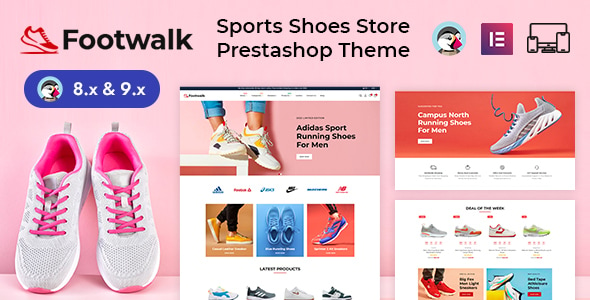
Footwalk – Sports Shoes & Footwear Store PrestaShop Responsive Theme is a modern eCommerce theme designed for businesses that want to create an attractive online store for sports shoes, sneakers, athletic footwear, casual shoes, and other footwear products. With a retail-focused design direction and a responsive storefront approach, Footwalk provides a foundation for presenting footwear collections, highlighting featured products, promoting special offers, and helping customers browse products with greater convenience. It is suitable for footwear retailers, sportswear brands, sneaker shops, shoe manufacturers, and entrepreneurs who want to establish or expand their online presence using the PrestaShop eCommerce platform.
The footwear industry serves a wide range of customers, from professional athletes and fitness enthusiasts to everyday shoppers looking for comfortable and fashionable shoes. An effective online store needs to present products clearly, organize collections logically, and provide useful information that supports purchasing decisions. Footwalk is intended to support this type of retail experience by offering a design foundation tailored to sports shoes and footwear eCommerce.
Whether you plan to sell running shoes, training footwear, basketball shoes, walking shoes, lifestyle sneakers, or everyday casual footwear, Footwalk can serve as a starting point for building a dedicated online shopping destination. Its final capabilities will depend on the original theme package, supported PrestaShop version, included modules, and store configuration.
A professional storefront helps establish the identity of a footwear brand and encourages customers to explore its collections. Footwalk is positioned for sports and footwear retail, making it suitable for businesses that want a product-focused website with a contemporary shopping presentation.
An organized visual layout can help customers compare different styles, discover new arrivals, and navigate between product categories. High-quality product images, clear product titles, readable prices, and consistent branding can contribute to a more convenient shopping experience.
Footwear stores often serve customers with different preferences. Some shoppers prioritize performance and comfort, while others are interested in fashion, color combinations, and the latest sneaker trends. A well-planned storefront should accommodate these different needs without making product discovery complicated.
Footwalk provides a starting point for developing that experience while allowing businesses to adapt their store presentation to their target audience and brand identity.
Footwalk is designed as a PrestaShop theme, making it relevant to businesses planning to use PrestaShop as their online store platform.
PrestaShop provides the underlying environment for managing product catalogs, categories, customer accounts, orders, and other eCommerce operations. A theme supplies the visual presentation layer that helps transform the store into a branded shopping destination.
Using a theme created for the intended platform can reduce the need to develop every storefront element from scratch. Store owners and developers can begin with the available design structure and customize it according to their business requirements.
Before installation, verify the theme’s supported PrestaShop versions, installation instructions, required modules, and compatibility with your hosting environment. These details are important for ensuring that the storefront works correctly with your chosen configuration.
Sports footwear is a broad category that includes shoes designed for different activities, surfaces, and performance requirements. Footwalk can provide a suitable storefront foundation for retailers who want to present several athletic footwear collections in one place.
Potential product categories include running shoes, gym shoes, training sneakers, basketball footwear, tennis shoes, walking shoes, and other activity-oriented designs.
A store can organize these products according to sport, intended use, collection, brand, or customer preference. For example, running shoes and gym trainers can be presented as separate categories to help customers identify relevant options quickly.
Product descriptions should communicate accurate information about sizing, materials, intended activities, available colors, and other relevant characteristics. Clear descriptions help shoppers understand the differences between products and make more informed decisions.
Sneakers have become an important part of everyday fashion, appealing to customers who value comfort, versatility, and contemporary design. Footwalk can also be considered by businesses that focus on lifestyle sneakers and casual footwear.
A sneaker store may offer minimalist everyday shoes, streetwear-inspired designs, chunky sneakers, slip-on footwear, canvas shoes, and casual trainers. Organizing these collections into clear categories can help customers discover styles that match their preferences.
High-quality product photography is particularly valuable for sneaker retailers. Images showing different angles, sole designs, materials, and colorways can help shoppers evaluate the appearance of a product before purchasing it.
Store owners can also use product descriptions to communicate available sizes, fit guidance, care instructions, and other relevant information. If the theme supports suitable promotional or featured-product sections, these can be used to highlight seasonal collections, new releases, or selected bestsellers.
Online shoppers may visit a footwear store using desktop computers, laptops, tablets, or smartphones. A responsive theme is intended to help the storefront adapt to different screen sizes and provide a more accessible browsing experience.
Mobile usability is especially important for fashion and footwear businesses, where customers frequently discover products through social media links, digital advertising, and search engines.
A responsive storefront should make it practical to browse categories, inspect product images, read product information, and access shopping controls on smaller displays.
After installing Footwalk, test the complete shopping journey on different devices. Check that navigation remains usable, images display correctly, text is readable, and product options are easy to select.
Responsive design alone does not guarantee fast loading or flawless behavior on every device. Performance also depends on hosting, image optimization, installed modules, and the way the store is configured.
A footwear store may contain hundreds of products with different styles, brands, sizes, and intended uses. Clear category organization can help customers find relevant items without browsing the entire catalog.
Footwalk can serve as a foundation for organizing a store around categories such as:
The precise navigation options available depend on the theme’s included features and the modules installed in PrestaShop.
A thoughtful category structure can improve usability by grouping related products together. Store owners should use straightforward category names and avoid unnecessary layers that make navigation difficult.
Where compatible filtering features are available, customers may also benefit from options such as size, color, price range, brand, and product type. Confirm whether these features are included or require additional modules.
Footwear purchases often involve several important considerations, including size, fit, design, material, intended use, and price. Product pages should provide enough information to help customers evaluate these factors.
Footwalk can provide a storefront foundation for displaying product images, names, pricing, descriptions, and purchasing information. Depending on the theme and PrestaShop configuration, product pages may also support variations, stock details, promotional prices, and related-product sections.
For a running shoe, a useful description might explain its intended activity, upper material, sole construction, cushioning characteristics, and available sizes, provided those details are accurate for the specific product.
For casual sneakers, descriptions might emphasize styling, materials, color options, and everyday use. A clear size guide can also help customers select an appropriate fit.
Always ensure that product information matches the actual footwear being sold. Do not make unsupported claims about comfort, durability, performance, or technical features.
The homepage is an important entry point for customers discovering a footwear brand. It should communicate the store’s identity and guide visitors toward relevant products.
Footwalk can be used as a starting point for a homepage strategy that highlights selected collections, new arrivals, seasonal promotions, popular products, and featured footwear categories, depending on the layouts and customization options included in the theme.
For example, a sports footwear retailer could feature running shoes and training collections, while a sneaker-focused business might highlight new releases and lifestyle footwear.
Promotional banners can also communicate genuine discounts, limited-time offers, or seasonal campaigns. Clear messaging and relevant product imagery help customers understand what the store offers without overwhelming them with too much information.
The exact banner layouts, product sections, sliders, and homepage modules should be confirmed against the original theme documentation before purchase.
Footwalk can be evaluated by different types of businesses operating in the footwear market.
Sports shoe retailers: Build an online catalog for running shoes, training footwear, and activity-specific products.
Sneaker stores: Present lifestyle sneakers, streetwear footwear, and fashionable everyday shoes.
Athletic footwear brands: Establish a branded online shopping destination for selected shoe collections.
Multi-brand footwear shops: Organize products from different manufacturers into a unified storefront, subject to your business arrangements and product data.
Casual shoe retailers: Showcase everyday footwear for customers looking for versatile styles.
Online shoe startups: Develop an initial eCommerce storefront and expand the catalog as the business grows.
Footwear wholesalers: Create a product presentation website for business customers, with additional functionality if wholesale pricing or account-specific purchasing is required.
These are potential use cases rather than a guarantee that every specialized feature is included in the theme. Advanced requirements, such as wholesale accounts, custom pricing, or business-to-business ordering, may need additional development.
A consistent brand identity helps a footwear store build recognition and distinguish itself from competing retailers. Footwalk can act as a foundation for adapting the website to your business name, logo, colors, typography, and product photography.
A performance-oriented store might emphasize athletic imagery and activity-based collections. A premium sneaker retailer may prefer a more minimalist presentation, while a family footwear business may need a broader catalog and straightforward navigation.
Consistent visual choices across the homepage, category pages, product pages, and promotional content can create a more cohesive experience.
Depending on the theme’s available settings, customization may involve adjusting visual elements, replacing demo content, organizing product sections, and updating banners. More advanced changes may require knowledge of CSS, JavaScript, or PrestaShop theme development.
Before making extensive modifications, review the theme’s documentation and maintain a backup of the original files.
An attractive design is only one part of running a successful footwear store. Accurate inventory, pricing, product variations, order processing, and customer communication are equally important.
PrestaShop provides the underlying environment for managing essential eCommerce operations. Footwalk supplies the storefront theme, while the platform and compatible extensions support the store functionality you configure.
For footwear businesses, product catalog preparation deserves particular attention. Products may be available in multiple sizes and colors, and inventory can differ between variations. Clear product data and accurate stock information help reduce customer confusion.
Before launching, configure applicable shipping methods, payment options, taxes, and order notifications. If you sell internationally, review shipping restrictions, currency presentation, and relevant consumer requirements.
Specialized features such as advanced inventory synchronization, returns automation, size recommendation tools, or warehouse integrations may require additional modules or custom development.
Search engine optimization can help customers discover your footwear products through relevant online searches. Footwalk provides a design foundation, but actual SEO results depend on your content, technical setup, competition, and ongoing optimization.
Use descriptive product titles and unique product descriptions. Organize category pages around meaningful terms, such as running shoes, men’s sports footwear, women’s sneakers, or casual shoes, where those categories accurately reflect your inventory.
Optimize product images for file size and provide useful alternative text. Use relevant metadata and readable URLs where supported by your PrestaShop configuration.
Avoid duplicating the same description across many products. Individual descriptions help communicate differences in materials, design, intended use, and available options.
You should also review page loading speed, internal links, indexability, and mobile usability. A theme alone cannot guarantee search rankings, traffic, or sales.
A reliable eCommerce website needs regular technical maintenance. After installing Footwalk, test its appearance, compatibility, and purchasing functionality before making the store publicly available.
Use secure hosting, configure an SSL certificate, maintain regular backups, and keep PrestaShop and compatible extensions updated. Install modules from trusted sources and remove unnecessary extensions that could increase maintenance complexity.
Optimize product images to help reduce loading times, particularly if your catalog contains many high-resolution footwear photographs. Test category pages, product variations, the shopping cart, checkout, and transactional emails before launch.
Always check compatibility before upgrading the PrestaShop version or modifying theme files. A staging environment can help you test significant changes before applying them to a live store.
Footwalk offers a footwear-oriented design direction for businesses looking to establish an online store using PrestaShop. It can provide a starting point for displaying sports shoes, sneakers, athletic footwear, and casual shoe collections within a branded shopping environment.
Its potential value lies in combining a retail-focused storefront foundation with the catalog management and eCommerce capabilities of the underlying platform. With appropriate product photography, well-organized categories, accurate descriptions, and reliable store configuration, businesses can create an online shopping experience suited to their customers.
The theme may be particularly relevant to retailers who want a dedicated footwear presentation rather than adapting a generic website design. However, the final suitability depends on the exact features, compatibility, and customization options included in the product package.
Footwalk – Sports Shoes & Footwear Store PrestaShop Responsive Theme is an option to consider when developing an online store for sports footwear, sneakers, athletic shoes, and casual shoe collections. Its product-focused purpose makes it relevant to footwear retailers, sports shoe brands, and entrepreneurs looking to establish a digital storefront.
By combining the theme with an organized product catalog, high-quality images, clear sizing information, suitable payment and delivery configuration, and consistent branding, you can build a professional foundation for your online footwear business.
Before purchasing or installing Footwalk, review the official product specifications, supported PrestaShop versions, included modules, documentation, and licensing terms to confirm that the theme meets your project requirements.
1. All digital products are the most recent version, with no possibility of free updates. After payment, you can request an update to the most recent version for 5 days if a new version is released. We free support within 5 days.
2. If a license is required (Excludes WHMCS license , we provide only method not license), please contact us via email or ticket for assistance with activation. Our license is only valid for activation and does not include support.
3. We provide Mobile, PHP script installation services for $19.90 / ₹1700. Please create a backup after installation as we do not support re-installation. For mobile app source code, we do not offer installation services.
4. If you have any questions, please contact us by email [email protected] or create a ticket on this page
5. Please note that any digital products presented on the website do not contain malicious code, viruses or advertising. You will receive the original files from the developers. We do not sell any products that have been downloaded from other websites.
6. The response time can last up to 6 hours.

Aivedo – AI Video Production Agency WordPress Theme Aivedo is a modern, creative, and technology-focused AI Video Production Agency WordPress Theme designed...
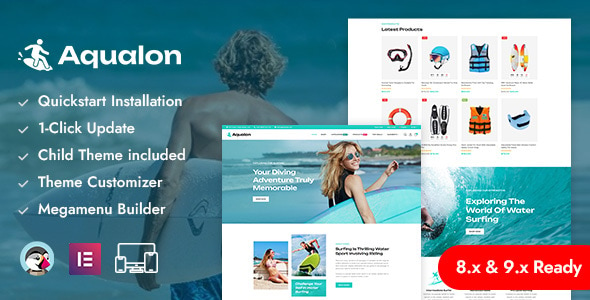
Aqualon – Surfing Board & Water Sports PrestaShop Responsive Theme Aqualon is a dynamic and visually stunning PrestaShop theme designed specifically for...
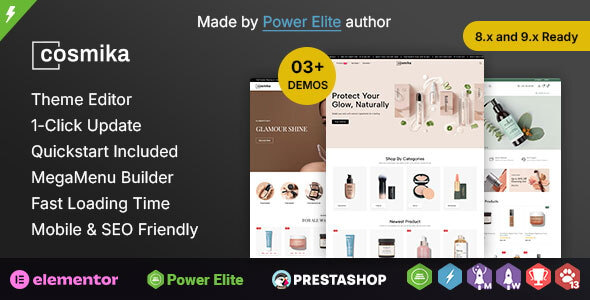
Cosmika - Cosmetics & SkinCare Elementor Prestashop Responsive Theme Cosmika is a beautifully designed and feature-rich PrestaShop theme created specifically for cosmetics...

Ledger - Consulting, Business & Corporate WordPress Theme Ledger is a professional and modern Consulting, Business & Corporate WordPress Theme designed for...
