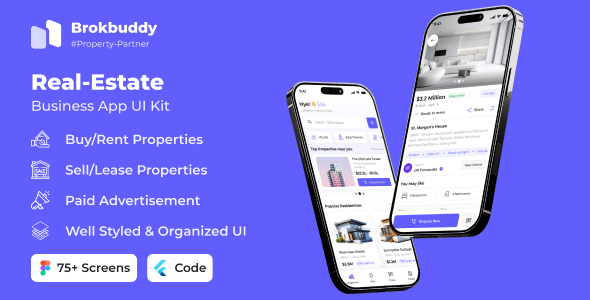
BrokBuddy | Real Estate Flutter App UI Template for Buyers, Sellers and Brokers is a modern mobile application UI template designed for developers, real estate agencies, property consultants, and entrepreneurs who want to build a real estate application using Flutter. Created around the needs of property buyers, sellers, and brokers, BrokBuddy provides a design foundation for developing a mobile experience focused on property discovery, listing presentation, and real estate interactions. Its purpose is to help developers establish a professional interface for a property marketplace while reducing the time required to design common screens from scratch.
The real estate industry increasingly relies on digital platforms to connect people with residential properties, commercial spaces, rental opportunities, and property professionals. A well-designed mobile application can make it easier for users to explore listings, review property information, and navigate between different stages of their property search. BrokBuddy is suited to projects that aim to create this type of experience through a Flutter-based interface.
Whether you are developing a property listing application, creating a digital product for a real estate agency, or planning a marketplace that connects buyers, sellers, and brokers, BrokBuddy can serve as a starting point for your mobile UI design. As a UI template, its actual screens, interactions, and included components should be verified against the product documentation before implementation.
A real estate application needs to present property information clearly while allowing users to explore listings without unnecessary complexity. BrokBuddy provides a property-focused design concept that can be customized to suit different real estate business models.
The interface can be adapted to display property photographs, listing descriptions, prices, locations, and other relevant details. A consistent visual hierarchy helps users identify important information and navigate through property-related content.
Developers can evaluate the available screens and adapt the design to residential property sales, rental listings, commercial real estate, or broker-focused applications. With appropriate branding and content, the template can provide a foundation for a polished mobile experience.
A clean interface is particularly important for property discovery because users often compare multiple listings before contacting an agent or property owner.
Flutter is Google’s UI toolkit for building applications for multiple platforms from a shared codebase. It uses the Dart programming language and provides a flexible approach to creating consistent interfaces across supported devices.
BrokBuddy’s Flutter-based positioning makes it relevant to developers who want to create a real estate mobile application without designing every screen independently for each platform.
Depending on the supplied package and license, developers may be able to customize layouts, modify screen components, update visual styles, and integrate the interface with their chosen application architecture.
Flutter can support Android and iOS development, but a UI template alone does not guarantee a complete production-ready application for both platforms. Platform configuration, dependencies, backend connectivity, device testing, and any required native integrations must be handled as part of the development process.
Property discovery is one of the most important parts of a real estate mobile application. Users generally want to explore available properties and compare options according to their preferences.
BrokBuddy can be evaluated as a design foundation for listing-browsing screens that present property information in an organized format. Depending on the included UI components, these screens may be adapted to display property cards, images, prices, locations, and brief descriptions.
Possible listing categories include:
These categories describe common real estate application use cases rather than confirmed built-in data categories. Developers can adapt the interface to match the property types supported by their intended application.
Property detail screens help users evaluate a listing before deciding whether to contact the seller or broker. A useful design should make important property information accessible without overwhelming the user.
BrokBuddy can serve as a starting point for presenting detailed property information in a structured mobile layout. Depending on the supplied screens, developers may be able to organize photographs, descriptions, prices, property specifications, and location details.
A completed property detail experience might include information such as the number of bedrooms, bathrooms, floor area, property type, amenities, and availability. The actual content should be supplied by the connected application or backend.
Developers can also consider adding image galleries, map views, sharing controls, or inquiry actions where appropriate. These features require confirmation of existing components or additional implementation if they are not included in the template.
Property buyers often need to explore multiple listings, compare important features, and contact the right professional before making a decision. A buyer-oriented interface should make these activities easy to understand.
BrokBuddy’s buyer-focused design concept can be adapted to present relevant property information and provide a clear path from discovery to inquiry.
A customized application might organize listings by location, price range, property type, or other criteria. It could also provide access to property details and contact options, depending on the features implemented by the developer.
For a production application, consider adding clear navigation, readable property specifications, useful search controls, and a consistent method for users to return to previously viewed listings. Advanced features such as saved properties, personalized recommendations, and search history require appropriate functionality beyond the visual template if not already supplied.
Property sellers need an effective way to present properties to potential buyers and communicate relevant details. A seller-oriented application can help organize property information and provide a convenient interface for listing-related activities.
BrokBuddy’s design can be evaluated for use in an application that allows sellers to present their properties through a mobile interface. Depending on the available UI screens, developers may adapt forms and content layouts for entering property titles, descriptions, prices, locations, and photographs.
A complete listing submission workflow may also require validation, image uploads, draft management, listing approval, and editing capabilities. These functions depend on the underlying application logic and backend services rather than visual design alone.
For a commercial property marketplace, it is also important to establish rules for listing verification, duplicate submissions, inaccurate information, and the removal of outdated properties.
Real estate brokers often manage multiple listings and communicate with buyers and sellers throughout the property search process. A mobile application can provide a convenient interface for presenting agent information and organizing property-related interactions.
BrokBuddy is intended for an audience that includes brokers, making it relevant to applications designed around professional property services.
Depending on the implemented functionality, developers could use the template as a starting point for agent profile screens, broker contact details, property portfolios, and listing-related information.
More advanced broker tools, such as lead management, client tracking, appointment scheduling, commission calculations, and team management, require specific backend functionality or integrations. These should not be assumed to be included in a UI template unless documented by the developer.
Users may need to narrow down large property catalogs to find listings that match their requirements. Search and filtering can help make a real estate application easier to use.
When evaluating BrokBuddy, review whether the supplied interface includes search fields, filter panels, category selectors, or related UI components. If these are available, developers can connect them to the appropriate data and filtering logic.
Potential search criteria for a real estate application include:
These are common real estate filtering options and should be treated as customization possibilities unless explicitly included in the template.
Property comparison tools, map-based discovery, location autocomplete, and real-time listing updates may require additional libraries, API integrations, or backend development.
A consistent design system helps create a recognizable and easy-to-navigate mobile application. BrokBuddy can provide a starting point for customizing the visual identity of a real estate product.
Depending on the supplied files, developers may be able to adapt colors, typography, buttons, cards, icons, spacing, and page layouts to align with their brand.
For example, a premium property marketplace may prefer an elegant visual style with large property photographs, while a rental discovery application may prioritize compact listing cards and quick access to filters.
Customizing shared interface components can help maintain consistency across the buyer, seller, and broker experiences. Developers should also review the project’s structure and reusable widgets before making extensive changes.
A real estate application should remain usable across a range of smartphone screen sizes. Property images, descriptions, prices, and navigation controls need to fit the available screen space without becoming difficult to read.
Flutter provides layout tools for building interfaces that adapt to different device dimensions. Developers working with BrokBuddy can evaluate its screen layouts and adjust spacing, text sizes, image proportions, and scrolling behavior where needed.
Testing on different Android and iOS devices can help identify issues involving small screens, larger text settings, keyboard interaction, image rendering, and navigation.
Accessibility should also be considered. Clear labels, appropriate contrast, readable typography, and sufficiently large touch targets can improve the experience for a wider range of users.
Every real estate business has its own target audience, market position, and visual identity. A customizable UI template can help developers adapt the application to a particular brand.
BrokBuddy can be evaluated for use by independent brokers, property agencies, real estate startups, and property listing businesses that want a branded mobile experience.
You can customize the app’s logo, color palette, typography, icons, images, and other supported interface elements. You can also adapt the messaging and screen layouts to focus on buying, selling, renting, or investment properties.
A consistent brand experience across onboarding screens, listing pages, property details, and user profiles helps make the application feel cohesive and professional.
A UI template provides the visual foundation of an application, while a backend generally supplies the data and business logic required for a fully functioning real estate platform.
Depending on the included package, BrokBuddy may need to be connected to a backend or API to support live property listings, user accounts, authentication, image storage, and other dynamic features.
Developers can evaluate backend options such as custom REST APIs or other compatible services based on their application’s requirements. A complete implementation may also need database models for users, properties, agents, inquiries, and listing statuses.
If the project includes static sample data, that data will need to be replaced or connected to a suitable data source for production use. Real-time synchronization, push notifications, and secure user permissions require additional configuration where they are not already implemented.
A real estate mobile application can support different business models depending on its features and target market. BrokBuddy may provide a UI foundation for developers who want to explore a commercial property platform.
Potential business models include:
These are possible business models rather than confirmed features of the template. Subscription management, payment processing, listing limits, advertisements, and premium access controls require suitable application logic and integrations.
Before choosing a monetization model, evaluate the target market, user acquisition strategy, operational costs, and local requirements relevant to real estate advertising and brokerage services.
To work with BrokBuddy, developers should review the included documentation, Flutter and Dart requirements, dependency versions, and platform setup instructions.
A typical workflow may involve extracting the project files, configuring the Flutter development environment, resolving dependencies, opening the project in a supported editor, and running the application on an emulator or physical device.
Before making major changes, review the directory structure, reusable widgets, navigation approach, assets, and configuration files. This helps developers understand how the existing interface is organized and where customizations should be applied.
For a production application, additional work may be needed for backend connectivity, authentication, image uploads, error handling, testing, and deployment to the relevant app stores. Keep dependencies updated and test the application after significant code changes.
BrokBuddy is worth evaluating for developers and businesses looking for a Flutter-based design foundation for a real estate mobile application.
Potential advantages include:
The actual screens, reusable components, source code structure, and functional capabilities depend on the product package supplied by the developer.
BrokBuddy | Real Estate Flutter App UI Template for Buyers, Sellers and Brokers is a mobile UI design solution for developers who want to explore building a real estate application with Flutter. Its property-focused concept makes it relevant to projects that connect buyers, sellers, and brokers through a mobile interface.
By customizing the supplied design and integrating the necessary backend services, developers can work toward a property discovery experience that presents listings, communicates important details, and supports property-related interactions. Before purchasing, verify the included screens, supported Flutter versions, source code availability, licensing terms, and any backend or API dependencies.
For a digital products marketplace, BrokBuddy can be positioned as a Flutter real estate UI template for buyers, sellers, and brokers. A clear product listing that distinguishes included interface components from features requiring additional development will help customers understand what they are purchasing.
1. All digital products are the most recent version, with no possibility of free updates. After payment, you can request an update to the most recent version for 5 days if a new version is released. We free support within 5 days.
2. If a license is required (Excludes WHMCS license , we provide only method not license), please contact us via email or ticket for assistance with activation. Our license is only valid for activation and does not include support.
3. We provide Mobile, PHP script installation services for $19.90 / ₹1700. Please create a backup after installation as we do not support re-installation. For mobile app source code, we do not offer installation services.
4. If you have any questions, please contact us by email [email protected] or create a ticket on this page
5. Please note that any digital products presented on the website do not contain malicious code, viruses or advertising. You will receive the original files from the developers. We do not sell any products that have been downloaded from other websites.
6. The response time can last up to 6 hours.
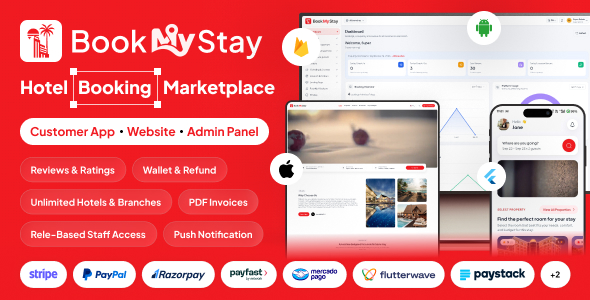
BookMyStay | Multi-Branch Hotel Booking App with Admin Panel BookMyStay | Multi-Branch Hotel Booking App with Admin Panel is a hotel booking...
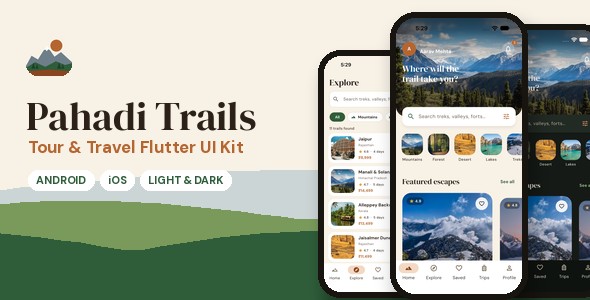
Pahadi Trails | Tour and Travel Flutter UI Kit Create an engaging travel booking experience with Pahadi Trails | Tour and Travel...
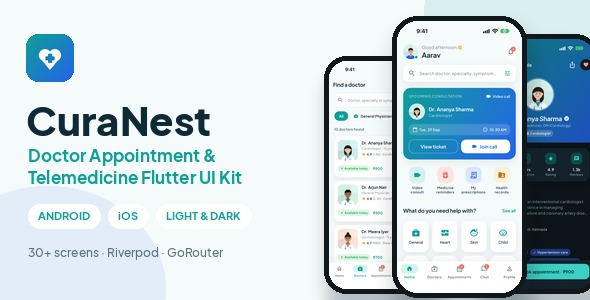
CuraNest | Doctor Appointment and Telemedicine Flutter UI Kit CuraNest | Doctor Appointment and Telemedicine Flutter UI Kit is a modern mobile...
AI Habit Flow | Flutter Habit Tracker UI Kit AI Habit Flow is a beautifully crafted Flutter Habit Tracker UI Kit designed...
