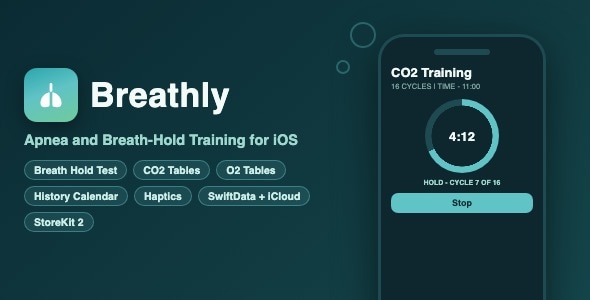
Breathly | Apnea and Breath-Hold Training App With CO2 and O2 Tables, History Calendar – SwiftUI is a specialized iOS application template designed for breath-hold training, apnea practice, and structured respiratory exercise tracking. Built with SwiftUI, Breathly provides a foundation for developing a focused training application that combines CO2 and O2 training tables, session management, historical records, and a calendar-based view of training activity.
Breath-hold training is practiced by various communities, including freediving enthusiasts and people interested in structured breathing exercises. Such training can involve carefully planned sessions, timed intervals, and consistent recordkeeping. A dedicated mobile application can help users organize their practice, follow training schedules, and review their previous sessions in one convenient place.
Breathly brings together the concept of structured breath-hold training and progress tracking through a native iOS-oriented interface. Its emphasis on CO2 and O2 tables gives developers a foundation for building an application around two common approaches used in apnea training, while the history calendar can provide a convenient way to review recorded activity over time.
Whether you are an iOS developer, a sports and fitness app entrepreneur, or a business exploring a specialized training application, Breathly offers a starting point for creating a focused breath-hold training experience. The exact capabilities, training logic, and customization options depend on the features included in the supplied project.
Apnea refers to the temporary cessation of breathing, and breath-hold training involves practicing controlled periods without breathing under appropriate conditions. Training routines can vary depending on the user’s experience, objectives, and the specific discipline involved.
Breathly is designed around this specialized training context. Rather than functioning as a general fitness tracker, its intended purpose centers on organizing breath-hold sessions and providing structured training-related information.
Depending on the supplied implementation, users may be able to access training tables, review session timing, and maintain records of their practice.
A dedicated application can make it easier to follow a repeatable session structure and maintain an organized history of training activity. It can also give developers a foundation for creating an interface tailored to users who want a focused tool for apnea-related practice.
Breath-hold exercises can carry serious risks, especially when practiced in water or without appropriate supervision. The application should be used as a tracking and organizational tool, not as a substitute for qualified instruction or appropriate safety precautions.
CO2 training tables are commonly associated with apnea training routines that use repeated breath-hold periods and planned recovery intervals. Some routines progressively adjust recovery periods to create a structured training sequence.
Breathly highlights CO2 tables as a central feature, making them an important part of the application’s intended functionality.
Depending on the supplied implementation, a CO2 table may present a sequence of training rounds, hold intervals, recovery periods, or other configurable session parameters.
A structured table can help users understand the sequence of a training session without manually calculating each interval. It can also provide a consistent format for recording and reviewing completed sessions.
Potential customization areas include table presets, interval configuration, session labels, and historical comparisons. The availability of these options should be confirmed against the original product demonstration and documentation.
Importantly, CO2 tolerance training should not be interpreted as a guarantee of improved breath-hold safety. Changes in breathing patterns can affect the body’s warning signals, and breath-holding exercises should never be used to justify pushing beyond safe limits.
O2 training tables are another commonly discussed approach in apnea training. These routines are generally structured around breath-hold intervals and recovery periods, with the aim of organizing practice related to breath-hold duration.
Breathly includes O2 tables in its product concept, providing a foundation for presenting this type of structured training information.
Depending on the implementation, the application may allow users to view an O2 training sequence, follow timed intervals, or review session-related information.
The exact table-generation rules, interval settings, progression methods, and customization options should be verified in the supplied source code and feature documentation.
For developers, O2 table functionality also provides opportunities to adapt the user experience to different training preferences, provided that any changes are developed responsibly and reviewed by qualified apnea-training professionals.
The application should not automatically be treated as a medically validated training program. Breath-hold durations and recovery schedules can present risks, and users should follow appropriate professional guidance rather than relying on an app to determine safe limits.
Consistency and organization can be important when maintaining a personal training routine. A dedicated application can help users keep track of planned exercises and record the sessions they complete.
Breathly provides a foundation for organizing apnea training into a more structured digital workflow. Depending on the included functionality, the application may support accessing training tables, progressing through session intervals, and maintaining records of completed practice.
A structured session interface can reduce the need to switch between separate timers, handwritten notes, and calendar applications.
Potential enhancements include session labels, configurable presets, interval notifications, and summaries of completed sessions. These should be treated as possible extensions unless the supplied implementation explicitly includes them.
Any timed training interface should be designed with clear controls and straightforward ways to stop a session. Software should never encourage users to ignore discomfort, continue beyond safe limits, or compete against unsafe breath-hold targets.
Maintaining historical records can help users understand how regularly they practice and review the sessions they have completed.
Breathly emphasizes training history as part of its intended feature set. Depending on the supplied implementation, users may be able to review previous training entries and access details associated with their recorded sessions.
A centralized history can help reduce reliance on separate notes or manual records. It can also provide context when users want to revisit previous training activity.
Potential record fields could include the session date, selected table, completed rounds, and other session information, depending on what the application stores.
The exact information recorded and the available editing, deletion, filtering, and export capabilities should be verified in the original product documentation.
Historical session data should be presented accurately, without implying that an increase in recorded breath-hold duration necessarily means that a user is safer or healthier.
The history calendar is a key element of Breathly’s product concept. A calendar-based view can make training activity easier to review by connecting sessions with specific dates.
Instead of navigating through a long chronological list, users may be able to view their practice history within a familiar calendar layout, depending on the supplied implementation.
A training calendar can help users identify when they recorded sessions, recognize gaps in their activity, and maintain a more organized personal record.
Potential extensions include date-based filtering, monthly summaries, session indicators, and navigation between previous training periods.
Calendar-based organization is particularly useful for users who prefer reviewing their routines visually rather than relying entirely on numerical statistics.
The actual calendar design, available session details, and data persistence behavior should be confirmed against the supplied project.
Breath-hold training frequently involves carefully arranged timing intervals. A dedicated interface can help users follow the intended sequence of a session more conveniently.
Depending on the included functionality, Breathly may provide timed training flows associated with CO2 or O2 tables. The exact timer controls, transition behavior, and notification mechanisms should be verified in the original implementation.
A well-designed interval interface should make the current stage of a session easy to understand and provide clear feedback when an interval begins or ends.
Possible enhancements include pause and resume controls, configurable sounds, visual countdowns, and accessibility options. Their availability depends on the supplied version.
Developers should carefully test timing behavior when modifying the application, including backgrounding, screen locking, interruptions, and changes in application state.
Because breath-hold sessions can involve safety risks, the app should clearly communicate that timers are organizational aids rather than guarantees that a particular training duration is safe.
Breathly is built with SwiftUI, Apple’s declarative framework for creating interfaces across supported Apple platforms.
SwiftUI supports state-driven interface development and reusable components, making it suitable for applications that present timers, training tables, calendars, and session history.
Depending on the supplied project architecture, developers may find separate views for training routines, interval displays, historical records, and calendar navigation.
The SwiftUI foundation provides a starting point for customizing the visual experience, including colors, typography, spacing, navigation, animations, and interactive controls.
Developers can also adapt layouts to improve readability during timed sessions, where clear information hierarchy and easily understood controls are particularly important.
Before customization, review the included source code, Swift version, Xcode requirements, deployment target, dependencies, and project organization.
A specialized training application benefits from a focused interface that helps users understand the current session without unnecessary distractions.
Breathly’s training-oriented design can provide a foundation for presenting CO2 and O2 tables, interval information, and session history within a dedicated mobile experience.
Depending on the included screens, users may be able to navigate between training options, view a selected table, and access previous session records.
Developers can customize the interface to suit different audiences, including freediving enthusiasts, apnea-training communities, and users interested in structured breathing exercises.
Potential improvements include larger timer displays, clearer session-stage indicators, accessible controls, configurable visual themes, and simplified navigation.
These are possible design enhancements rather than guaranteed features of the original template. The actual user interface should be evaluated using the supplied demo or screenshots.
Historical records can provide context for understanding a user’s training routine. When presented carefully, they can help users review their consistency and reflect on their practice.
Depending on the included data model, Breathly may support reviewing previous sessions through its history and calendar functionality.
Potential future additions include weekly or monthly activity summaries, training frequency charts, personal notes, and comparisons between selected historical periods.
Such insights can help users understand their recorded activity without encouraging unnecessary competition or unsafe attempts to extend breath-hold times.
If advanced analytics are not included, they may require additional development to define appropriate metrics, store relevant data, and present meaningful summaries.
Any progress information should clearly distinguish between recorded activity and validated measures of health or training safety.
Breathly can serve as a starting point for developers who want to create a more specialized apnea training application.
Potential extensions include additional table presets, configurable session parameters, custom training labels, expanded history filters, data export, and improved session summaries.
Other possible additions include multilingual interfaces, onboarding tutorials, accessible timer controls, and optional synchronization between supported devices.
Developers may also explore instructional content that explains training terminology and provides responsible guidance on using the application. Such content should be reviewed by qualified professionals familiar with apnea training and safety.
These enhancements depend on the supplied architecture and may require changes to data models, session logic, interface components, or storage mechanisms. They should not be interpreted as existing features unless documented in the original product package.
Training history may contain information about an individual’s routines, session dates, and recorded performance. A production application should handle such information responsibly.
Before launching Breathly commercially, developers should review how session data is stored, whether it remains local to the device, and whether any external services receive it.
If cloud synchronization or account functionality is added, access controls, secure network communication, and appropriate data deletion procedures should be considered.
Local storage, encrypted backups, cloud accounts, and data synchronization should not be assumed to be included unless explicitly documented.
Clear privacy information can help users understand how their training records are handled and what control they have over their information.
Breathly may be relevant to several types of users and development projects.
The product’s suitability depends on the actual features included, the intended audience, and the safety standards applied to the final application.
Before using Breathly, review the supplied documentation to identify the development environment, dependencies, and supported iOS versions.
A typical SwiftUI development workflow may require a compatible Mac, an appropriate version of Xcode, the required iOS SDK, and an Apple development account for certain testing and distribution activities.
Setup may involve opening the project in Xcode, resolving dependencies, configuring the application identifier, and selecting an appropriate simulator or physical device.
After installation, test the training-table interface, interval transitions, history recording, calendar navigation, and data persistence. Timed functionality should be tested across relevant interruption scenarios.
Confirm whether the supplied package includes source code, setup instructions, documentation, updates, and technical support. These items depend on the seller’s offering.
Before purchasing Breathly, review the original demonstration, screenshots, feature list, and technical documentation.
Confirm which CO2 and O2 table features are implemented, how session timing works, what information is stored in training history, and how the calendar displays previous activity.
Do not assume that the template includes medically validated training programs, advanced physiological monitoring, cloud synchronization, HealthKit integration, or professional coaching unless those features are explicitly documented.
Breath-hold training can cause loss of consciousness and drowning, particularly when practiced in water or alone. Users should receive appropriate safety guidance and qualified instruction. The application should never encourage underwater breath-hold practice alone, hyperventilation before breath-holding, or attempts to push through warning signs. It should not be presented as a medical device or a substitute for professional supervision.
Breathly | Apnea and Breath-Hold Training App With CO2 and O2 Tables, History Calendar – SwiftUI offers a specialized foundation for developing a native iOS application centered on structured breath-hold training and session organization.
With its focus on CO2 and O2 tables, training history, and calendar-based activity review, Breathly can help developers explore a dedicated mobile experience for users interested in apnea-related practice.
Whether you are building a specialized training utility, exploring the freediving application market, or customizing a SwiftUI project for a particular audience, Breathly is worth evaluating as a development starting point. Review the included functionality, technical requirements, data-handling approach, and licensing terms to determine whether it meets your project needs.
1. All digital products are the most recent version, with no possibility of free updates. After payment, you can request an update to the most recent version for 5 days if a new version is released. We free support within 5 days.
2. If a license is required (Excludes WHMCS license , we provide only method not license), please contact us via email or ticket for assistance with activation. Our license is only valid for activation and does not include support.
3. We provide Mobile, PHP script installation services for $19.90 / ₹1700. Please create a backup after installation as we do not support re-installation. For mobile app source code, we do not offer installation services.
4. If you have any questions, please contact us by email [email protected] or create a ticket on this page
5. Please note that any digital products presented on the website do not contain malicious code, viruses or advertising. You will receive the original files from the developers. We do not sell any products that have been downloaded from other websites.
6. The response time can last up to 6 hours.
Eris — Mental Wellness & Mindfulness Elementor Template Kit Eris — Mental Wellness & Mindfulness Elementor Template Kit is a modern website...
Elyora - Spa & Wellness Centers WordPress Theme Elyora is a luxurious and professionally designed Spa & Wellness Centers WordPress Theme created...
Melora – Mental Health & Therapy WordPress Elementor Template Kit Melora – Mental Health & Therapy WordPress Elementor Template Kit is a...